![Diane Poremsky [Outlook MVP]](http://www.outlook-tips.net/images/2014/MVP_BlueOnly.png)
A common problem with Outlook’s calendar: “Jan 2010 spans 6 weeks but there is not sufficient room to display the appointments. If I view Dec 2009 and use the scroll bar at the left of calendar I can see 5 weeks at a time.” Questions like this come up a lot and I think I put out a tip each time a month covers 6 weeks. Your January covers 6 weeks because you have … [Read more...] about Tip 695: Not enough weeks this month
Tips Archive
Tip 694: Week numbering
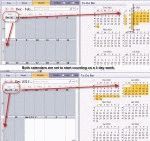
The first week of the new year often brings questions about which week should be the first official week of the year. In Outlook there are 3 options - start on Jan 1, on the first full week, or the first 4 day week. Choosing the 4 day option is probably the most common and is true to ISO standards, although choosing other than Sunday or Monday for the first day of week … [Read more...] about Tip 694: Week numbering
Tip 693: Outlook on a new computer
It’s the time of year when many people get new computers and wonder about the legalities of installing their existing software on the new system.“Can I legally install my Office 2007 on my new laptop too in addition to the installation that I already have in my PC? Does the operating system on each computer affect the answer?”In most cases, you are permitted to install two … [Read more...] about Tip 693: Outlook on a new computer
Tip 692: Office Online calendar publishing workaround
While we wait for the publishing problems at Office Online to be fixed, try this workaround – it finally worked for me after several tries. Go to office.com and sign in with the same Live ID you use to publish your calendar and select "Save my e-mail address and password". Restart Outlook and the browser. It should now work for either publishing or updating a subscribed … [Read more...] about Tip 692: Office Online calendar publishing workaround
Tip 691: Hotmail passwords
As mentioned yesterday, calendar publishing is having problems and asking for passwords frequently. We know the cause of the calendar problem is a buggy server. But what about all of the other times Outlook can’t seem to remember the Live password? I know from experience if the Internet connection is bad and Outlook can’t reach the mail server, it will ask for the … [Read more...] about Tip 691: Hotmail passwords