![Diane Poremsky [Outlook MVP]](http://www.outlook-tips.net/images/2014/MVP_BlueOnly.png)
There is a problem with Live calendar publishing – it keeps asking for the Live ID password over and over. This is not a problem on your end and republishing the calendar will not stop the password dialog. There is something wrong with the publishing server or LiveID. Unfortunately, the only way to get rid of the annoying prompt (before its fixed) is to stop … [Read more...] about Tip 690: Live calendar password
Tips Archive
Tip 689: Automatic Underlines
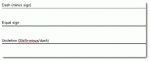
This is really a Word problem and since Word is also the Outlook email editor, I’ll mention this handy (and sometimes annoying) feature. A user asked: "When typing ==== then hitting return, Outlook puts in a double line. This line cannot be selected, formatted, or deleted. Turning borders off moves the line. Selecting all text before and after and hitting delete moves the … [Read more...] about Tip 689: Automatic Underlines
Tip 688: Coloring Calendars
An Outlook user asked: “How do you change the background color of the calendar in Outlook 2007? I would like to change the background from white to yellow.” Tools, Options, Calendar Options has a setting for Calendar color - this applies to the calendar’s non-working hours. The working hours are always white (in later versions of Outlook). [In Outlook 2010, look in File, … [Read more...] about Tip 688: Coloring Calendars
Tip 686: Correction: Copy names and addresses
Following up on yesterday’s tip – you need to use File As field, not the Full name field, otherwise you’ll get the field name in the copy (but not on screen). (I double checked the view I use for this purpose to verify the field, but typed Full Name anyway.) I you’re copying a large number, search and replace can remove the field name or see … [Read more...] about Tip 686: Correction: Copy names and addresses
Tip 685: Copy Contact name and address blocks
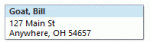
A user had this question:I occasionally need to copy the name, title, company and address of an individual contact to a Word or Excel document. Or in some cases all of the data I have for a contact. Is there a way to do that without copying line by line. It seems like there should be a way to copy and paste all of the data for a contact with a single command - … [Read more...] about Tip 685: Copy Contact name and address blocks