![Diane Poremsky [Outlook MVP]](http://www.outlook-tips.net/images/2014/MVP_BlueOnly.png)
This is another calendar sync bug or maybe it’s another ‘no end date’ bug – this time All day events that recur yearly are changed to recur every 12 years. It seems to be related to ActiveSync, Outlook 2007 SP2 and all day events with no end date, possibly affecting only users who sync their mobile device with two computers. If your calendar is affected by this bug, … [Read more...] about Tip 662: Recur every 12 years
Tips Archive
Tip 661: Could not find an Editor for H(.) files
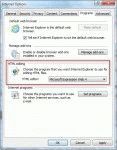
When a problem starts coming up often, it usually means it's time for a tip addressing it. The problem:I want to insert an image into my signature. When I click Advanced Edit I then click yes on using another editor. I get an error saying it can't find an editor for "H(.) files" . Help!Go to Control Panel, Internet Options, Programs tab and change the … [Read more...] about Tip 661: Could not find an Editor for H(.) files
Tip 660: Office Web Apps beta
This isn’t an Outlook tip today, because Outlook isn’t offered as a web app- only Word, Excel, PowerPoint, and OneNote…. but I thought it might be of interest to some of my readers. If you have a Live mail account (including Hotmail or MSN) and would like to try the Office Web Access beta (it allows you to edit Office docs online) – log into the Live mailbox online, go to the … [Read more...] about Tip 660: Office Web Apps beta
Tip 659: Do you keep Outlook open 24/7?
An Outlook user was curious about the % of people who "use" OL but do not have it opened 100% of the time. There aren’t too many stats for this, so we’ll collect our own in a unscientific poll with an unknown margin of error. Anyone can respond to the poll - its open for anonymous voting –but posting comments requires registration. … [Read more...] about Tip 659: Do you keep Outlook open 24/7?
Tip 657: “Unable to open the Outlook window” error
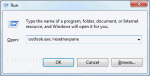
Another frequent complaint lately: “I receive the following message when trying to open my email: Cannot start Microsoft Office Outlook. Unable to open the Outlook window. Could not open folders. No stores were found to be open.” You need to reset the navigation pane to fix it. To do this, in the Start menu's Search field, or press Windows key + R to open the Run command then … [Read more...] about Tip 657: “Unable to open the Outlook window” error