![Diane Poremsky [Outlook MVP]](http://www.outlook-tips.net/images/2014/MVP_BlueOnly.png)
If you would like to always BCC yourself, you need to either use VBA or a utility as Outlook’s rules can only CC an address.See To automatically Bcc all outgoing messages (Outlookcode.com) for a VBA code sample or Automatically BCC All Messages (slipstick.com) for a list of utilities you can use to always BCC an address. … [Read more...] about Tip 649: Always BCC
Tips Archive
Tip 648: Always use plain text
If you don’t like HTML mail or stationery, you can force plain text as the formatting for all incoming email. In Outlook 2007, its in Tools, Trust Center, Email security. Outlook 2003 has it in Tools, Options, Email options. Both Outlook 2007 and 2003 allow you to change the format of any message back to HTML by clicking on the Infobar. All replies will be plain text. … [Read more...] about Tip 648: Always use plain text
Tip 645: Reminder Sounds
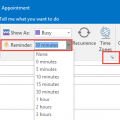
Did you know you can set different reminder sounds for each appointment? It’s easy, just click the sound button when setting the reminder and choose a different sound.In Outlook 2007 and newer, click the expand arrow on the right side of the Options chunk to access the sound dialog or select it from the bottom of the Reminder Time selector.Note: Recurring events … [Read more...] about Tip 645: Reminder Sounds
Tip 644: Deleted Distribution List
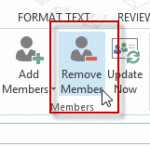
It’s easy to accidentally delete a Distribution List - clicking the Delete button deletes it, not the selected members of the DL. To remove members from the DL, you need to click the Remove button.The deleted DL will be in Outlook’s Deleted items folder. If you have a lot of items in your Deleted items folder, the easiest way to find it is by searching for it by name or … [Read more...] about Tip 644: Deleted Distribution List
Tip 643: Color Categories and Shared Mailboxes

A user working with shared calendars has a problem with color categories: she wants to color code appointments but she can’t add her categories to appointments on the shared calendars and she can’t add new categories to the shared calendars as all of the color category options are grayed out. Adding new color categories while working in her calendar makes them available for her … [Read more...] about Tip 643: Color Categories and Shared Mailboxes