• Skip to main content
  • Skip to primary sidebar
  • Skip to footer

Outlook Tips

Learning Microsoft Outlook One Tip At A Time

Diane Poremsky [Outlook MVP]

  • Home
  • Tips Archive
  • How to...
  • Beginner
  • Outlook.com

Tip 749: Disabling Outlook's Tooltips and Popups

Outlook has several different tooltips, screentips or popups that annoy users:

Message List

When you hover over messages in Outlook a sometimes rather large screen tip pops up. 
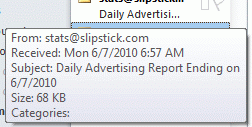
Tool tips in Outlook

This screentip shows you the fields in the view that are not completely visible in the message list. You can’t disable these screen tips, or increase the length of time the mouse hovers over a message before the tip displays. These screentips are an “overflow” area for the fields in the view and they’ll disappear if you adjust the width of the message list; some fields can be removed by removing them from the view.

Please note that the Windows option for showing screentips/popups does not affect Outlook. On many forums you'll find advice to edit this registry key: [HKEY_CURRENT_USER\Software\Microsoft\Windows\CurrentVersion\Explorer\Advanced] and change the Value ShowInfoTip to 0. Not only does this not work in Outlook, you also don't need to edit the registry to change it. It's an option in Windows Explorer's Folder Options, View tab, down near the bottom.

Folder List

When the mouse hovers over folder names in the navigation pane or folder list, Outlook pops up the full name in a tooltip. This tool tip often obscures the folder below and provides little useful information for most users.

Folder list tooltip

There is not a switch or option to turn it off, but you can prevent these popups if you either use shorter file names or make the navigation pane section wider – the tips only display when the folder name is too long to be completely visible.

Toolbar Buttons

You can disable the screen tips you see when hovering over toolbar commands in File, Options, General tab (Outlook 2007/2010) or Views, Customize, Toolbars.
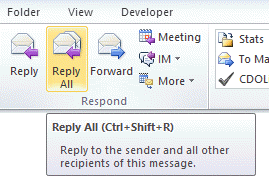
button and ribbon tooltips

Published June 7, 2010. Last updated on April 3, 2012.

Share this:

  • Twitter
  • Facebook
  • LinkedIn
  • More
  • Print
  • Tumblr
  • Reddit
  • Pocket
  • Pinterest

Related posts:

Do you need to convert a distribution list to individual contacts?  Although Outlook doesn’t have an option to save individual conTip 529: Create Contacts from a DL It's often annoying to wait for Norton's antivirus scanner to complete when you open a document – it's also a waTip 248: Disabling Antivirus Document Scanning Outlook 2003 doesn't have a horizontal scroll bar on the Navigation panes, which means if you have long folder names, you'Tip 250: Viewing long folder names When you have more than one Contacts folder or address list enabled as an address book Outlook will use the folder when it resolveTip 280: Resolving Addresses
Subscribe
Notify of
11 Comments
Newest
Oldest Most Voted
Inline Feedbacks
View all comments

Primary Sidebar

Search OutlookTips

Training and one-on-one assistance

Do you need help setting up Outlook or want some one-on-one training? I'm available for hire. See Training and one-on-one assistance for fees and to check availability.

All-Time Most Popular Posts

  • Windows 7 and Vista Start Search field
    How to start Outlook in safe mode
  • outlook.com icon
    Delete a message stuck in Outlook's Outbox
  • How to use Outlook's Command line switches
  • Use Cleanviews switch to reset all views
    How to Reset the View on Outlook folders
  • Where are my Outlook Files?
  • Folder paths
    How to Find Folder Paths in Outlook Mailboxes
  • How to use Scanpst.exe to repair Outlook data files
  • Outlook's Missing Holidays
  • backstage page
    Where is File tab in Outlook?
  • Icons found in the Inbox, Message Headers, and Toolbars

Footer

Recent Posts

  • Log into multiple Outlook on the web accounts
  • Keeping Hackers out of Microsoft accounts
  • Microsoft Account Closure Email
  • Outlook on the web Quick Actions moved to the right
  • Automatically sign out of Outlook.com

Recent Bug List

Microsoft keeps a running list of issues affecting recently released updates at Fixes or workarounds for recent issues in Outlook for Windows.

Office Update History

Update history for supported Office versions is at Update history for Office

Resources

Ask questions and share your knowledge in Outlook Forums.

You Might Like

Where is File tab in Outlook?
Using Two-factor authentication
Where are my Outlook Files?
How to use Outlook's Command line switches

© 2003–2025 · Outlook Tips

wpDiscuz
You are going to send email to

Move Comment