• Skip to main content
  • Skip to primary sidebar
  • Skip to footer

Outlook Tips

Learning Microsoft Outlook One Tip At A Time

Diane Poremsky [Outlook MVP]

  • Home
  • Tips Archive
  • How to...
  • Beginner
  • Outlook.com

Tip 985: Do 'something' when an Outlook reminder fires

Today's tip is two handy macros that run when Outlook's reminders fire.

Open a web page using a task reminder

The first macro is triggered by Task reminders and loads a web page when the reminder goes off. With a little tweaking, you could use it to open almost any file type.

To use, create a task with the web page url in the Subject field. Set the reminder time and date and assign the category "Open Page".
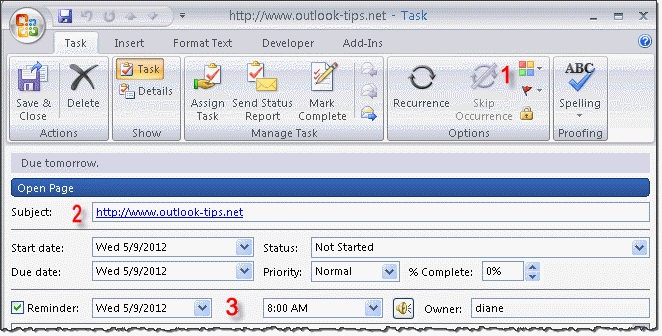
Create a task using the web address as the Subject

When a reminder goes off, the code checks to see if it's a Task reminder and if so, if it is assigned the category named "Open Page". If so, it opens Internet Explorer and navigates to the URL that is the Task Subject.

Get this code sample at Open a webpage when a Task reminder fires.

Send email using an appointment reminder

The second macro sends an email when an appointment reminder fires.

To use, create an appointment with the recipient's email address in the Location field and the message in the Appointment body. Assign the "Send Message" category and save and close.
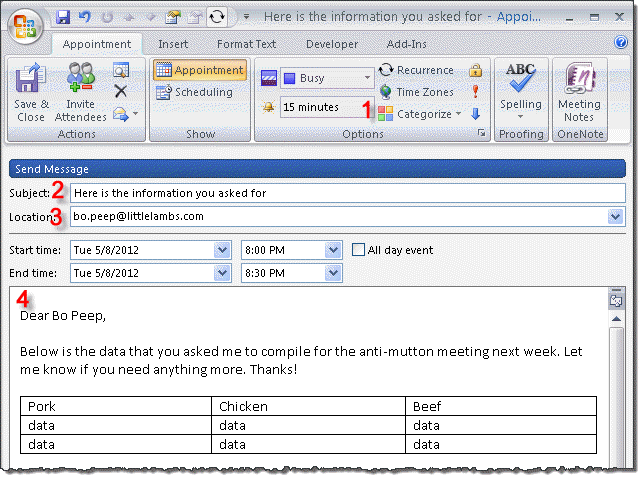
Use an appointment reminder to send an email

When a reminder fires, the code checks to see if its an appointment reminder and if so, if it has the category "Send Message". If it finds the category, it copies the email address in the location field to the To line of a new message and copies the appointment body to the email message body and sends it.

Because the message is composed from the appointment and sent immediately, the time stamp is "now", which makes it a nice replacement for Outlook's other methods for sending messages later.

A second macro on this page sends an email to one address (such as to your cell phone) when any reminder fires.

Get these code samples at Send an email when an Appointment reminder fires.

Published May 8, 2012. Last updated on May 8, 2012.

Share this:

  • Twitter
  • Facebook
  • LinkedIn
  • More
  • Print
  • Tumblr
  • Reddit
  • Pocket
  • Pinterest

Related posts:

Many users are confused by the message Outlook displays when they attempt to use IE's File, Send link to menu option. It saysTip 122: Outlook Blocked Access Tip 215: Send Reports on Schedule You can open documents and web pages using appointments if you create an online meeting. Open an meeting invitation (or click theTip 217: Open Files on Schedule This bug is fixed in Outlook 2010 SP1 Outlook 2010 SP1 I thought I posted this bug a long time ago but search doesn't bring itTip 882: Outlook 2010 default reminder time bug (Fixed)
Subscribe
Notify of
0 Comments
Newest
Oldest Most Voted
Inline Feedbacks
View all comments

Primary Sidebar

Search OutlookTips

Training and one-on-one assistance

Do you need help setting up Outlook or want some one-on-one training? I'm available for hire. See Training and one-on-one assistance for fees and to check availability.

All-Time Most Popular Posts

  • Windows 7 and Vista Start Search field
    How to start Outlook in safe mode
  • outlook.com icon
    Delete a message stuck in Outlook's Outbox
  • How to use Outlook's Command line switches
  • Use Cleanviews switch to reset all views
    How to Reset the View on Outlook folders
  • Where are my Outlook Files?
  • Folder paths
    How to Find Folder Paths in Outlook Mailboxes
  • How to use Scanpst.exe to repair Outlook data files
  • Outlook's Missing Holidays
  • backstage page
    Where is File tab in Outlook?
  • Icons found in the Inbox, Message Headers, and Toolbars

Footer

Recent Posts

  • Log into multiple Outlook on the web accounts
  • Keeping Hackers out of Microsoft accounts
  • Microsoft Account Closure Email
  • Outlook on the web Quick Actions moved to the right
  • Automatically sign out of Outlook.com

Recent Bug List

Microsoft keeps a running list of issues affecting recently released updates at Fixes or workarounds for recent issues in Outlook for Windows.

Office Update History

Update history for supported Office versions is at Update history for Office

Resources

Ask questions and share your knowledge in Outlook Forums.

You Might Like

Where is File tab in Outlook?
Using Two-factor authentication
Where are my Outlook Files?
How to use Outlook's Command line switches

© 2003–2025 ยท Outlook Tips

wpDiscuz
You are going to send email to

Move Comment