• Skip to main content
  • Skip to primary sidebar
  • Skip to footer

Outlook Tips

Learning Microsoft Outlook One Tip At A Time

Diane Poremsky [Outlook MVP]

  • Home
  • Tips Archive
  • How to...
  • Beginner
  • Outlook.com

Tip 967: How to View Email in a Browser

Outlook doesn't display animated gif's (only the first frame displays), form fields or any active content in email, all thanks to numerous viruses that spread like wildfire through Outlook, so the powers that be locked Outlook down: no active content will display in email.

Outlook's printing capability is also limited and you'll have more print options (such as print selected text) if you use View in Browser.

If you don't need to see animated gif's, use form fields, or print a selection from the message, Outlook renders HTML formatting very well, but it may not always be "perfect" and a browser will do a better job.

When you send an animated gif, you'll only see the first frame, but the recipient will see the animation if they use an email client that can display animation.

You could save the message as HTML and open the HTML is a browser, but this is not necessary (and too much effort!) since as you can open messages in a browser directly from Outlook.

To view an HTML message in a web browser, you need to open the message! The View in Browser command is not available in the Reading Pane.

Outlook 2007 and newer

  1. Open the message.
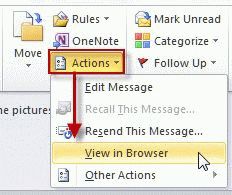
  2. Click the Other Actions button on the Actions group.
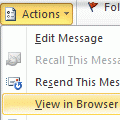
  3. From the flyout menu, choose View in Browser (its near the bottom)
    View in browser command in Outlook 2007/ 2010

Use View in Browser to view any HTML message that does not display correctly in Outlook or when you want to print a message and have better options than Outlook’s print option offers.
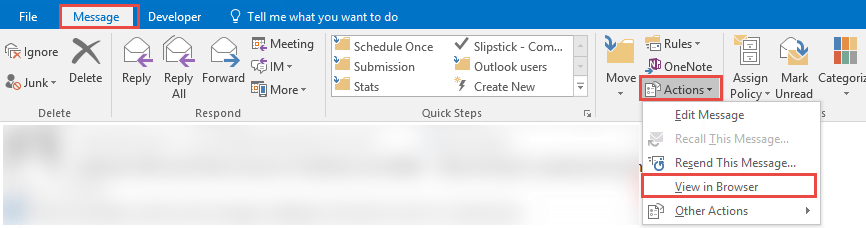
view in browser command in Outlook 2016

Outlook 2003 and older

Older versions don't have a View in Browser command but they do have a View in Internet Zone command. This allows you to view an HTML message in the less secure Internet Zone. This allows you to view active content in email.
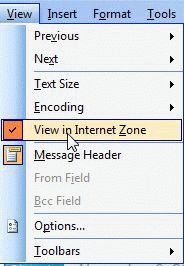
View in Internet zone
You'll find this command on the View menu of an opened message.

More Information

Outlook 2007, 2010, 2013 inability to animate gif's is because it uses Word as the rendering engine and Word does not support animation. Word's lack of support for animated gif's is for security & licensing reasons. (Plus, printed documents don't display animation.)

Published March 27, 2012. Last updated on December 3, 2015.
Share this:

  • Twitter
  • Facebook
  • LinkedIn
  • More
  • Print
  • Tumblr
  • Reddit
  • Pocket
  • Pinterest

Related posts:

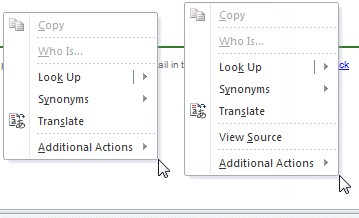
Tip 404: Printing Workaround in Outlook 2007 (and up) Tip 397: Email Header Doesn't Print Just a few pixels higher and view source is not visibleTip 939: View Message Source in Outlook Do you want use FireFox as your default browser but Outlook won't use it when you click on hyperlinks? First, make sure FirefoTip 186: Make FireFox the Default Browser
Subscribe
Notify of
16 Comments
Newest
Oldest Most Voted
Inline Feedbacks
View all comments

Primary Sidebar

Search OutlookTips

Training and one-on-one assistance

Do you need help setting up Outlook or want some one-on-one training? I'm available for hire. See Training and one-on-one assistance for fees and to check availability.

All-Time Most Popular Posts

  • Windows 7 and Vista Start Search field
    How to start Outlook in safe mode
  • outlook.com icon
    Delete a message stuck in Outlook's Outbox
  • How to use Outlook's Command line switches
  • Use Cleanviews switch to reset all views
    How to Reset the View on Outlook folders
  • Where are my Outlook Files?
  • Folder paths
    How to Find Folder Paths in Outlook Mailboxes
  • How to use Scanpst.exe to repair Outlook data files
  • Outlook's Missing Holidays
  • backstage page
    Where is File tab in Outlook?
  • Icons found in the Inbox, Message Headers, and Toolbars

Footer

Recent Posts

  • Log into multiple Outlook on the web accounts
  • Keeping Hackers out of Microsoft accounts
  • Microsoft Account Closure Email
  • Outlook on the web Quick Actions moved to the right
  • Automatically sign out of Outlook.com

Recent Bug List

Microsoft keeps a running list of issues affecting recently released updates at Fixes or workarounds for recent issues in Outlook for Windows.

Office Update History

Update history for supported Office versions is at Update history for Office

Resources

Ask questions and share your knowledge in Outlook Forums.

You Might Like

Where is File tab in Outlook?
Using Two-factor authentication
Where are my Outlook Files?
How to use Outlook's Command line switches

© 2003–2026 · Outlook Tips

wpDiscuz
You are going to send email to

Move Comment