Scanpst (aka the Inbox Repair tool) is found in your Office installation folders, usually C:\Program Files\Microsoft Office\OfficeXX, where XX is your version of Office. In Vista and Windows 7 64-bit, the folder is C:\Program Files (x86)\Microsoft Office\OfficeXX.
Note: The scanpst icon is a broken envelope. This is supposed to indicate that it works with broken messages. It does not mean the application is broken.
Replace XX in the following to match your version (the textboxes below are editable), then copy and paste it into the Address bar of Windows Explorer and press enter to open ScanPST.
| Outlook 2010 = 14Outlook 2007 = 12 Outlook 2003 = 11 Outlook 2002 = 10 Outlook 2000 = 9 | If you are unsure of your version Help, About will list the version in ’12.6310.5000′ format. If Outlook was installed as part of a suite, Help, About in any of the Office programs will have the correct version number. |
Open Scanpst.exe
On 32-bit Windows or with 64-bit Outlook, using the default installation locations, scanpst.exe is located at:
C:\Program Files\Microsoft Office\OfficeXX\scanpst.exe
On 64-bit Windows with 32-bit Outlook, scanpst.exe is at:
C:\Program Files (x86)\Microsoft Office\OfficeXX\scanpst.exe
You can either use Windows search to find scanpst.exe or browse to it using Windows Explorer. We also offer the following shortcut you can type or paste into into Start menu’s search field or into the Run command (press Windows key + R to open the Run command). Don’t forget to change the XX to your correct Office version. (You can change the version number in the textbox before copying it.)
If using 32-bit Windows or 64-bit Windows & 64-bit Outlook use:
%programfiles%\Microsoft Office\OfficeXX\scanpst.exe
For 64-bit Windows & 32-bit Outlook:
%ProgramFiles(x86)\%Microsoft Office\OfficeXX\scanpst.exe
Using Scanpst.exe
After scanpst opens, click Browse and browse to the location of the PST. Or paste the following line in the File name field and click Open. This will open the PST location in the file browser. (This path works in all versions of Windows if Outlook created the pst in the local application data path. If you moved the pst or Outlook 2010 created the pst file in My Documents, you’ll need to click Browse. )
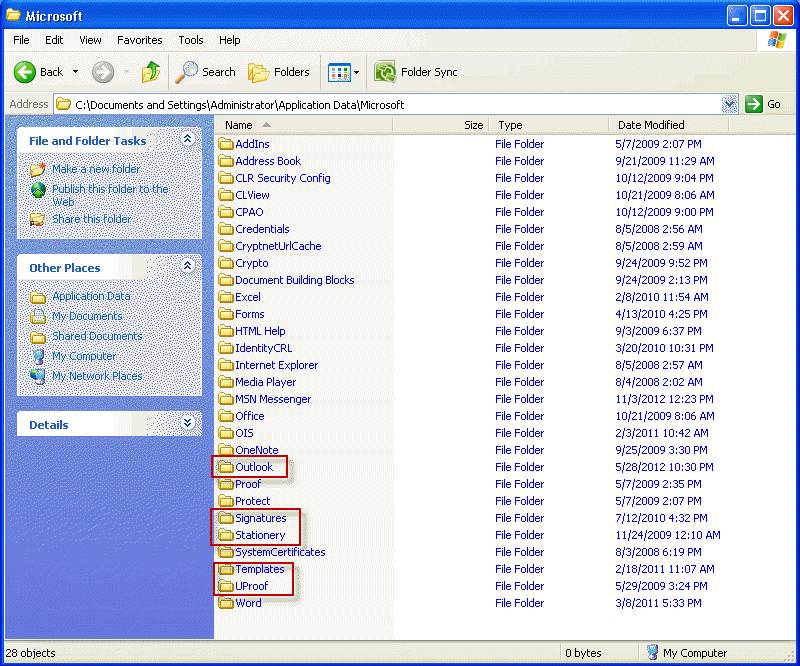
%USERPROFILE%\Local Settings\Application Data\Microsoft\Outlook
Select your PST from the list (most people will have just one) click Open, then Start to begin testing the PST
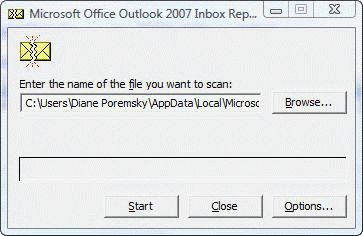
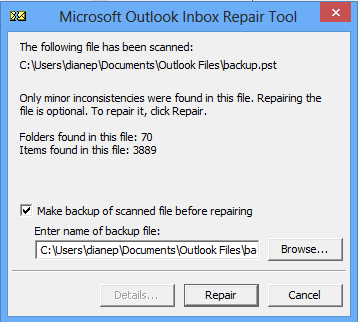
When ScanPST is finished running the tests, a dialog reports the errors found. If you need to repair the PST, always make a backup.
More Information
See the following articles for more information:
Repair a damaged Personal Folders PST file
Repair a 2gb Personal Folders file or Offline Folders
Related posts:
« « How to Reset the View on Outlook foldersMicrosoft Outlook keyboard shortcuts » »


I have been through this page every which way. All searches end with the program denying that the pst file exists. This is maddening and the help files are useless.
Mark Hermodson
What type of email account do you have configured? You may not have pst files.
i repair outlook.pst file but not fix my problem outlook 2007 databinding please sole this problem
At what point do you get that error? Does outlook work in Safe mode? (Close Outlook. Hold Ctrl as you click on the Outlook icon to start in Safe mode.)
I know one cause is related to Outlook Today – right click on the root folder where outlook today is and choose properties, then restore defaults on the folder home page tab. If you can’t right click on that folder, go to tools, options, other tab, adavanced and set the start folder to inbox or calendar. Restart outlook and try the right click to restore the home page defaults again.
I have run the scanpst.exe file on a couple of occasions. It seems to work for a little while and then says it is not responding. how long should the process take? My PST file is almost 15gb. thanks in advance for your help
With a data file that size it’s going to take awhile. If possible move the older messages you don’t need weekly access to, to a new pst. If you can offload about 10gb it will run better.
thanks. but the problem is i can’t access the file at all and the scanpst.exe always comes up with a “not responding” error.
i can’t reduce the size until i can get access to it. any suggestions on that front?
Hello, I have the same problem, I have finished the first step … scanpst… done … but once I click on Repair …it’s not responding … waiting …. waiting … but not responding … what should I do in this case ? please , I need your help .How can I open my outlook again ?
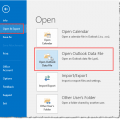
How large is the pst file? It can take “forever” to repair large pst files. I get into Outlook “now”, rename the pst file and let outlook make a new one. You may be able to open the old pst file using File, Open, Outlook Data file.
does scanpst.exe actually works for Outlook PST repair? I have bit of problem, i ran this tool again and again but to no avail. it always fails. Suggest me something good.
Yes, scanpst does work just fine. Occasionally, a pst file may be seriously damaged and you’ll need a paid product. A complete list of paid offerings is at Repair a damaged pst file. One of the three listed at the top should be fine, but there are more to choose from at the bottom of the page.
If it is damaged and won’t open in outlook, you will need to use a commercial product. See Repair a damaged pst file for instructions and links to all of the pst repair products.
This worked a treat for me. Took some time. Thank you!
Thank you so much. this is the best website I have ever been to for help.
It helped me fix PST errors quickly with all ease & efficiency.
My original problem was that when I tried to open Outlook I would get a message to run inbox repair. After much ado I was able to find and run.
I ran the scanpst.exe on my PC and after 2 runs it says that there are no errors.
When I try to open my Outlook now. I still get the same message that I got originally
” Cannot start Microsoft Office Outlook. Can not open the Outlook Window. The set of folders cannot be opened errors have been detected. C:\Users\……..etc.
I have tried to do the reset nav pane, start in safe mode and still the same message.
I built a guest account with my ATT Yahoo mail info and was able to open and download
all my e-mail messages from 1-11-12 which was when this whole mess started.
I am working with someone at Microsoft Communities but so far it seems that we are not communicating ( I can seem to tell him how the problem started) So if you can help me I would very much appreciate your help.
Pretty desperate and frustrated at this point.
What would be the next step when after running scanpst.exe 2, when files shows no errors now ( it did show errors originally) and I still get the same message ” Cannot Start Microsoft Office Outlook. Can not open the Outlook the set of folders cannot be opened erros have been detected. C:\Users\…..etc.
I have tried reser nav pane, start in safe mode and still same.
I built a guest account, plugged in my ATT Yahoo Mail server in and was able to download my e-mails from 1-11-12 which is when this whole mess started.
I am working with someone at MIcrosoft Communities but so far we do not seem to be communicated.
I am at a loss and very frustrated. I can read and can follow instructions on what to do.
Thanks!!!!!!
Try this: close outlook. Go to Control panel and search for Mail. Open your profile and add a new pst file to the profile. Set it as default. Restart outlook. Does it work? If not, go back into the Control panel and open your profile then remove the old pst from your profile. This will get outlook working and we just need to try and repair the old pst file.
Hi Diane — I discovered your page with great interest and hope! I wonder if you might have any advice for me?…..
I’ve located the scanpst tool and have inserted various file extensions that have been recommended, including the one you mentioned above, all to no avail (and yes I did use my personal username).
Error message reads: the path for the file “C:\yada yada yada….” does not exist. Type a valid path and file name.
Any thoughts regarding what the problem might be?
Thank you kindly! :)
Yvonne
Are you getting that message when you try to scan the pst file? If so, it means the pst is corrupt and scanpst can’t repair it.
Cannot start Microsoft Office Outlook. Cannot open the Outlook window. The set of folders cannot be opened. Errors have been detected in the file, C:\Users\xxxxxx\AppData\Local\Microsoft\Outlook.pst. Quit Outlook and all mail-enabled applications, and then use the Inbox repair tool (Scanpst.exe) to diagnose and repair errors in the file. For more information about the Inbox repair tool, see Help.
This is the message I get when I open Outlook. Once it opens it closes and gives me this message. I cannot run the Scanpst.exe from the Inbox because it will not stay open. I have gone to the actual file location on hard drive and tried to run it from there but nothing happens here either.
I created another profile and tried that but that yeilded the same result.
I am currently at a loss please help!!
Hi outlook confgiration is wil in yahoo but give this msg
Errors have been detected in the file D:\abdul khaliq Emil content\outlook.pst.Quit outlook and all mail-enabled applications, and then use the inbox repair toll (scanpst.exe)to diagnose and repair errors in the file.for more information about the inbox repair tool see help. what i can corctly
I try all the steps you mention above and give me their is no Error, my PST file is about 4 GB, I can send or receive or even delete old mail
Please your advice
Thanks in Advance
Amr el Chimy