
![Diane Poremsky [Outlook MVP]](http://www.outlook-tips.net/images/2014/MVP_BlueOnly.png)
Log into multiple Outlook on the web accounts
If you have more than one Microsoft account, you’ve faced the problem of either signing in and out to switch accounts or using Sign in with a different account to switch accounts and discovering you were switched back to the original account. The solution: browser profiles. All major browsers support separate profiles, and they are easy to set up and switch between in Edge and Chrome.
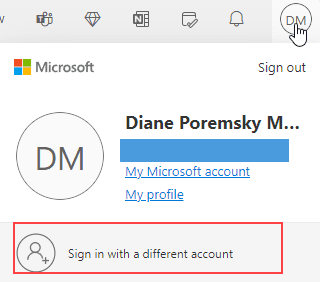
While you can use private browser windows, you’ll be able to stay signed in to your account when you use browser profiles.
When you use separate profiles, cookies, passwords, history and other properties cached in the browser are kept separate. The advantage over using a different browser: you can open another profile from the browser window.
To create a profile in Edge or Chrome:
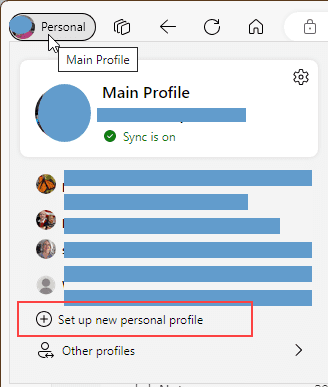
- Click on your avatar in the address bar area, in Chrome and some versions of Edge, it’s on the right, but may be on the left.
- Click the avatar to expand the menu and at the bottom of the menu, click Add (Chrome) or Set up new personal profile (Edge).

- Name your profile. You can sign into the account you’ll be using with the profile, to sync history and passwords. Or use it without signing in.
- When you want to use the profile, click on the avatar and select the profile name from the menu. This will open a new browser for your profile.
If you want to pin a shortcut for the profile to your taskbar, create a shortcut for Edge, using this command as the target (with the correct profile name).
"C:\Program Files (x86)\Microsoft\Edge\Application\msedge.exe" --profile-directory="Profile 2"
To create profile shortcuts in Chrome, open Settings > You and Google > Customize profile. Under the Pick an avatar section is a switch to create a desktop shortcut for the profile. This will open the correct settings page in Chrome: chrome://settings/manageProfile
Edge has an option that will open the profile an email account is signed into (for syncing) when you open links in that email account. You can also configure Edge so specific links always open in a specific profile. I find it annoying, but it might be useful if you use work and personal Microsoft accounts and want to keep everything to separate.
Recent Articles
Keeping Hackers out of Microsoft accounts
Anyone with an old outlook.com account – including Hotmail, Live, or MSN addresses – is highly likely to have the address “out in the wild”, either due to a data breech or posted to a public forum or website. You can google for your address to see if it was posted on any public facing […]
Microsoft Account Closure Email
Did you receive an email from Microsoft that your account was going to be closed and wonder if the message was real or a phishing attempt?
Outlook on the web Quick Actions moved to the right
Users began complaining last week that the quick actions in Outlook on the web (when the reading pane is off or on the bottom) moved from the From field on the left side of the message list to the far right, in the Received column, which for many users, is a long mouse movement to use the quick actions.
Automatically sign out of Outlook.com
… or stop automatically signing in to Outlook.com. When I open Outlook.com, I'm always automatically signed into my account. I don't want this to happen. According to Help, I just need to uncheck the box to "stay logged in" but that doesn't seem to make a difference. How do I prevent this? If you don't […]
Quick Actions in Outlook
An Outlook user wondered why he his accounts had different icons on the right side of the message list. I have two accounts setup in Outlook. In one account, I have the Mark as Read/Unread icon appear when I select a message. In the other account, I only have Flag and Delete. How do I […]
Outlook Autocomplete Bug
There is a bug in the current Office update, April 29, 2021 Version 2104 (Build 13929.20296). Microsoft is aware of the issue. The autocomplete menu is larger than in the previous build, lacks the ability to delete entries from the list, and may open upward. This autocomplete list looked this like in the Outlook 2019 […]