![Diane Poremsky [Outlook MVP]](http://www.outlook-tips.net/images/2014/MVP_BlueOnly.png)
The first week of the new year often brings questions about which week should be the first official week of the year. In Outlook there are 3 options – start on Jan 1, on the first full week, or the first 4 day week. Choosing the 4 day option is probably the most common and is true to ISO standards, although choosing other than Sunday or Monday for the first day of week could throw Outlook off.
Erik discovered Outlook 2007 has a problem deciding which week number should be used to end 2012 and start 2013. (This bug also affects Outlook 2010; other versions are not affected as they show the week date only in the navigation calendars.)
"How does Outlook calculate the week numbers? In my part of the world, the first day of the week is Monday. Now if I look at the Outlook calendar and browse towards January 2013 I see something strange: The week from 31 Dec. 2012 to 06 January 2013 has week number 53. The following week however has week number 2. So where is week number 1 of the year 2013?"
A screenshot of this anomaly:
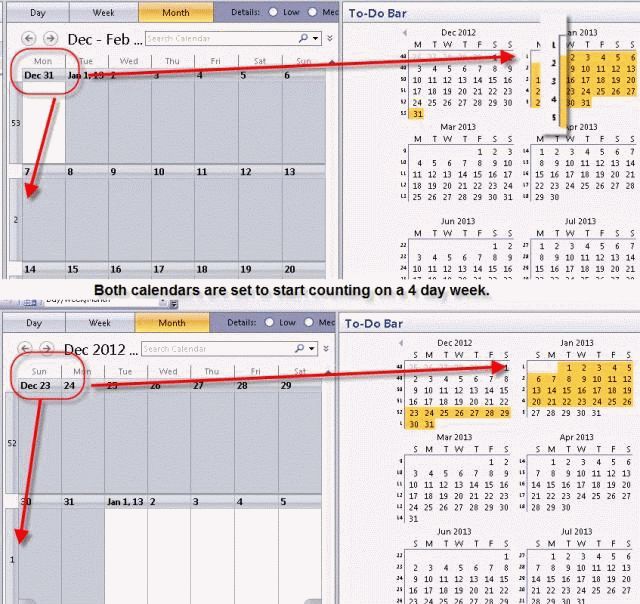
Outlook numbers the weeks correctly when the week is set to start on Sunday (set in Tools, Options, Calendar options) but gets confused when the week starts on Monday. The underlying data is not affected and the January navigation calendar is numbered correctly (when you view both Dec 2012 and Jan 2013), only the number drawn on the calendar is wrong.
See //en.wikipedia.org/wiki/ISO_week_date to learn more about week numbering.
Published January 5, 2010. Last updated on October 31, 2011.