![Diane Poremsky [Outlook MVP]](http://www.outlook-tips.net/images/2014/MVP_BlueOnly.png)
Many users are surprised when they discover they can’t sort by category. It is possible to sort by category but you need to use the By Category view, and sort the groups by name.
Outlook's Categories work this way because the category field can contain multiple categories (and few would want to sort by the first category only), while each group is made up only of items in one category.
And no, upgrading to the latest, greatest version will not change how this feature works. It's a limitation of the multi-value field.
If you really, really want to sort by the category string, you could use a macro to create a custom Text field. However, it will sort by the first category in the list, and as seen in this screenshot, it's less than useful, as the categories are listed in the reverse order they were added to an item. If you only use one category on each item, it may work for you.
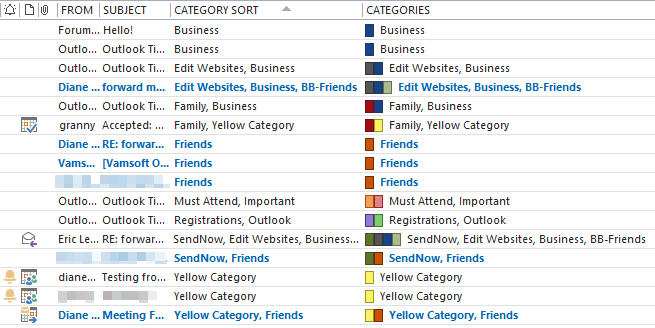
I created the Category Sort field using the following macro. See How to use macros if you are new to Outlook programming.
Public Sub SortCategory()
    Dim currentExplorer As Explorer
    Dim Selection As Selection
    Dim obj, objMail As Object
    Dim objProp As Outlook.UserProperty
    Dim strCategory
    Dim i

    Set currentExplorer = Application.ActiveExplorer
    Set Selection = currentExplorer.Selection

    On Error Resume Next

 For Each obj In Selection
         Set objMail = obj
         strCategory = objMail.Categories

         Set objProp = objMail.UserProperties.Add("Category Sort", olText, True)
         objProp.value = strCategory
         objMail.Save

        Err.Clear
    Next

    Set currentExplorer = Nothing
    Set obj = Nothing
    Set Selection = Nothing
End Sub
Published July 16, 2008. Last updated on May 3, 2017.