Tip 480: Outlook 2007/2010 Previous and Next Handles

February 29, 2008
By

Outlook 2007 and Outlook 2010′s Calendar shows “Previous Appointment” and “Next Appointment” handles in the day, week, and month views when there are no appointments for the visible dates. These handles will help you find appointments on your calendar and you can’t turn them off, short of adding appointments to the one of the days in the view.
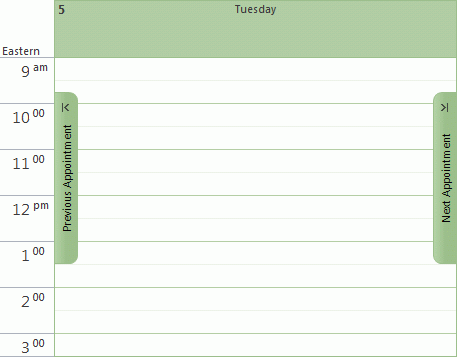
Outlook's previous and next handles on the calendar

Related posts:

Tip 364: Go to Appointment Date
Tip 375: Outlook 2007 (and 2010): Contact Linking
Tip 330: Delete Future Recurring Appointments
Tip 195: Using Two Time Zones
Tip 376: Outlook 2007: Calendar Printing Assistant
« « Tip 479: Partial Word Search
Tip 481: Outlook 2007 Passwords Won’t Save » »

Leave a Reply

Your email address will not be published. Required fields are marked *

Connect with Facebook

*


Outlook Daily Tips by Email

*  Your Email Address:

Resources

Ask questions and share your knowledge in Outlook Forums.

More Outlook and Exchange articles available at Outlook and Exchange Solutions Center

Follow me on:

Follow @Outlooktips on Twitter   Join Outlooktips on Facebook