![Diane Poremsky [Outlook MVP]](http://www.outlook-tips.net/images/2014/MVP_BlueOnly.png)
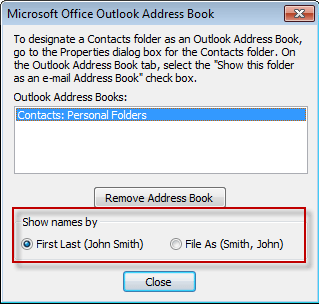
You can change how your address book entries are sorted by changing the sort order in the Address book options dialog.
Your choices are "First Last" or "File as" format.
To change this in Outlook 2003 and older, go to Tools, E-mail accounts, View or change existing directories or address books, Outlook Address Book, Change, Set your sort order.
Published December 22, 2003. Last updated on June 7, 2013.