![Diane Poremsky [Outlook MVP]](http://www.outlook-tips.net/images/2014/MVP_BlueOnly.png)
In Outlook 2003 and older, by default, the Outlook Calendar in Day/Week/Month view combines Saturday and Sunday in one cell. Disable this by right clicking anywhere on the calendar and choose Other Settings. Uncheck the option to Compress weekend days.
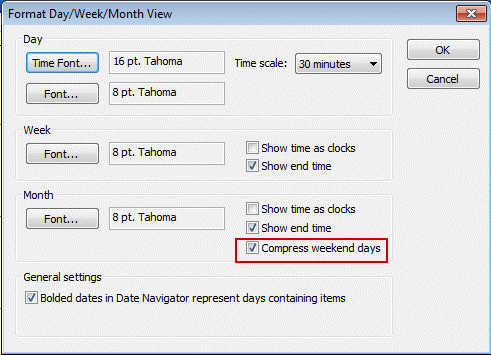
This is a view setting and resetting the view will turn Compressed weekends back on. If you need to switch between compressed views off and on, you can create a custom view with it turned off.
Compressed weekends are not available in Outlook 2007 and above.
Published September 2, 2003. Last updated on August 11, 2013.