![Diane Poremsky [Outlook MVP]](http://www.outlook-tips.net/images/2014/MVP_BlueOnly.png)
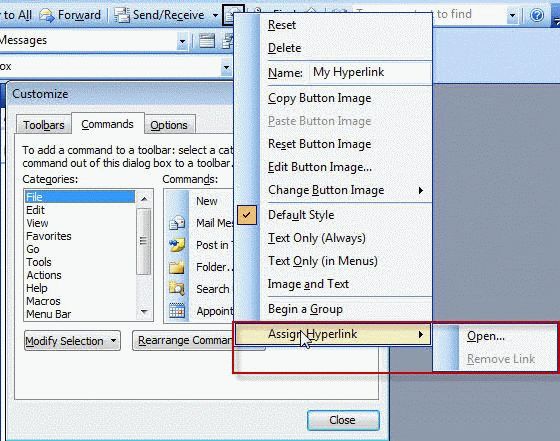
Outlook 2002 and Outlook 2003 support hyperlink toolbar buttons. You can add hyperlink to any file, application, web page or e-mail address.
- Open the Customize dialog using Tools, Customize.
- From the Commands tab, drag any button to a toolbar, except menus such as New.
- Right click on the button and choose Assign Hyperlink.
- Enter the path to the file or program you want the button to run.
- Right click on the button again to edit the Name and Image – the tool tip displays the file path.
- Close the Customize dialog and the button is ready to use.
Update: For Outlook 2007 and Outlook 2010, see Customize the Outlook Toolbar, Ribbon or QAT
Published August 5, 2003. Last updated on June 26, 2013.