![Diane Poremsky [Outlook MVP]](http://www.outlook-tips.net/images/2014/MVP_BlueOnly.png)
A user has this question: “Is there a way to create a Custom View of Tasks that will show past due tasks as well as any tasks that are due in the next seven days? Is this the type of thing that you can write into the SQL tab?”
You could use the SQL tab, but its easier to use the Advanced tab and use Due Date, on or before, and type in “7 days from now” (without the quotes). I like to add Completed equals No to remove completed tasks from the view.
A screenshot of the completed filter is here:
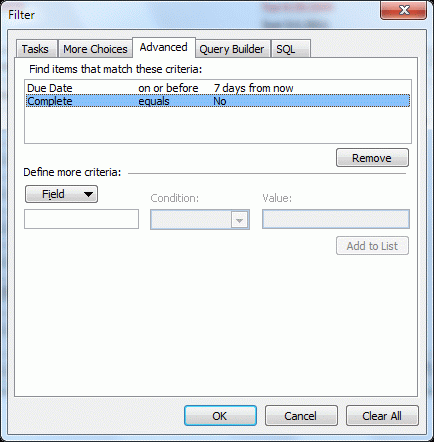
In Outlook 2010, go to View ribbon, View Settings, to create the filter. In older versions, right click on the row of field names and choose Custom (or Customize). You can also access this dialog from the Views menu – look for the Customize command.
Published April 28, 2011. Last updated on November 8, 2012.