![Diane Poremsky [Outlook MVP]](http://www.outlook-tips.net/images/2014/MVP_BlueOnly.png)
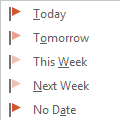
One behavior that annoyed a lot of longtime Outlook users is how Outlook handled Flag for Follow up reminders. If you used the Today flag and had reminders enabled for all tasks with a due date, Outlook set the reminder to 1 hour before the end of your business day.This behavior changed in Outlook 2007. When you use Outlook 2007, Outlook 2010, or Outlook 2013, a message … [Read more...] about Flag for Today Reminder Times
reminder time
Tip 1003: Default Start and Due Dates for Tasks
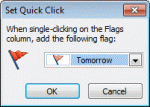
I've written about Tasks and default reminders at least once or twice, but this bears repeating: The default you choose for Quick Click affects the default reminder date and time, as well as the default start and due dates. How you create the new task form plays a part too, even which folder you are looking in when you type in the new item row makes a difference. How do you … [Read more...] about Tip 1003: Default Start and Due Dates for Tasks
Tip 730: Custom Flags and Reminder Times
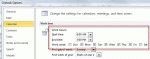
When you use custom flags in Outlook 2007 and 2010, the default reminder time depends on your choice for the Quick Click flag and the start or end time for your work day, set in Calendar options.If Quick click is set to Today, it’s reminder is 1 hour before the end of the work day (set in Options, Calendar options). Custom flags also use this reminder time.When Quick … [Read more...] about Tip 730: Custom Flags and Reminder Times
Tip 510: Change Reminder Times
A user asks: “Is there any way I can change the options for ALL recurring events. When I add a birthday into my contacts it sets the reminder at 15 minutes starting at 12:00 a.m. I would like to change the reminder and the time to something else without having to do them all individually. Also how can I set a category without doing it all individually as well?” Ah, … [Read more...] about Tip 510: Change Reminder Times