![Diane Poremsky [Outlook MVP]](http://www.outlook-tips.net/images/2014/MVP_BlueOnly.png)
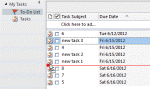
We also get a lot of questions asking how to re-order Tasks, or more accurately, why users can no longer re-order Tasks. This is usually caused by changing the view so my first suggestion is verify you are using the Simple or Detailed view then reset the view.There are two ways to re-order tasks: change the sort order or drag the tasks up and down the list. Drag to reorder … [Read more...] about Drag to Reorder the To-Do List
to-do
Tip 949: Reminders and Tasks in Other Data Files
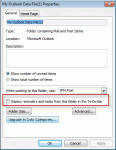
We had two questions about tasks, reminders, and flags recently. One used wanted to know how to prevent reminders and flags from his archive pst file from displaying while the other user wanted to know how to make the reminders show. I get a lot of emails and my pst files are very large (12-17GB) with just the email I get during one year. So at the end of each year I make a … [Read more...] about Tip 949: Reminders and Tasks in Other Data Files
How to show only Tasks in the To-Do List

Not everyone likes the To-Do List opening as the default folder when switching to the Task pane. Some users just want to see tasks, not flagged messages, and would like to delete the To-Do list or set the Tasks folder to open by default: I have a problem with the To-Do List under My Tasks in Outlook, in the navigation pane. I have my Tasks set up in Tasks. I do not use the … [Read more...] about How to show only Tasks in the To-Do List