![Diane Poremsky [Outlook MVP]](http://www.outlook-tips.net/images/2014/MVP_BlueOnly.png)
You can add frequently used commands to the Quick Access Toolbar by clicking on the down arrow at the end of the QAT and choosing More Commands.
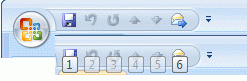
While you may think “I don’t need the QAT, the commands I use are on the default ribbon and easy to access”, it can be a real time saver since the shortcut key for the items on the QAT is Alt+n, where n represents the command’s position.
Since this is a feature of the ribbon, it works in all Office applications that use the ribbon, including Word and Excel.
This screenshot shows the QAT and the Alt+ shortcut key.
Published February 16, 2009. Last updated on February 5, 2013.