![Diane Poremsky [Outlook MVP]](http://www.outlook-tips.net/images/2014/MVP_BlueOnly.png)

A reader wanted to know how to recall or cancel a task assigned to someone so that she could reassign to it someone else.While you can’t recall the task, as long as you have a copy on your task list you can create an unassigned copy and assign the copy to someone else. Click Details tab or button to access the Unassigned Copy command.This effectively cancels the … [Read more...] about Tip 630: Cancel Assigned Tasks
Tip 628: Show Start and End times
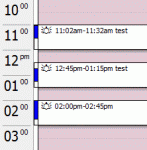
A reader asks:“I use Outlook 2003 and want my appointments to display the Start and End time of each appt, next to the title of each appointment, while I am in Work Week view.Outlook does what I want it to if I create an appointment that starts/ends at an atypical time. For example if I make an appt named Default Appt it will be displayed as a block that says … [Read more...] about Tip 628: Show Start and End times
Tip 627: More on Calendar Shortcuts
Before I get into today’s tip, a reminder – there is a spam making the rounds with the subject “Outlook Setup Notification” – this is a phishing attempt to get your email account information. Don’t fall for it. :) To clarify yesterday’s tip:“You can Ctrl+ click on dates in the navigation calendar and select up to 14 days. The Next month arrows will move the first selection to … [Read more...] about Tip 627: More on Calendar Shortcuts
Tip 626: Calendar tips
One of my favorite Calendar tricks is viewing just 2 or 3 weeks so I can see more appointments in each date cell. To do this, select 2 or more weeks in the navigation calendar. (See View a Two Week Calendar if you need to see screenshots or video.) You can use this trick if you need to review a certain time period, such as the end of the month, over several months – just … [Read more...] about Tip 626: Calendar tips
Tip 625: RSS and HTML Preview
If you use Outlook 2007’s RSS feature and want to display the full content inside Outlook instead of giving link to "View Article", set the RSS feed to download the full content as HTML then you can select the HTML attachment to display it in the preview pane. To do this, go to Tools, Account settings, RSS tab – select the feed and click Change, select the option to … [Read more...] about Tip 625: RSS and HTML Preview