![Diane Poremsky [Outlook MVP]](http://www.outlook-tips.net/images/2014/MVP_BlueOnly.png)
A couple of weeks ago I promised to tell you how to add fields to display the Exchange 2003 IMF SCL (spam confidence level), Sender ID value and sender's mail address in the message list. Each of these fields uses a custom configuration file that defines the field so Outlook can display the Extended MAPI property in the message list. Instructions and the cfg files needed to … [Read more...] about Tip 329: Exposing MAPI Fields
Tip 327: More on Changing Tab Order
Last week a reader asked how to change the tab order on a contacts form. A second way to change the tab stops is using the Tab Order dialog on the Layout toolbar. Use Ctrl+Click to select more than one control and you can move them up and down as a group. While it works well to move the address fields ahead of the phone number fields, if you have many to reorder and can't do … [Read more...] about Tip 327: More on Changing Tab Order
Tip 326: Change the Contacts Tab Order
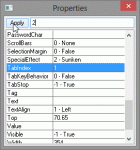
Ann asks:Is there a way to change the order of the tabs as you enter new information for a new contact...i.e, it tabs from Name to Title to Company then it jumps to the phone/fax/mobile fields and then back to the address. Can it be changed to tab from Name to Title to Company and then directly to address...then to phone fields?Yes, you can change the tab index … [Read more...] about Tip 326: Change the Contacts Tab Order
Tip 325: Who is Requesting Read Receipts?
Would you like a visual indicator that someone is requesting a read receipt? Download and extract this pst: //www.poremsky.com/p/files/RRR.zip, then copy the RRR view so that its for ""All folders"". Extract the RRR.pst from the zip and open it using the File, Open menu in Outlook. Click on one of the folders in the pst. Find the Define Views menu (Views, … [Read more...] about Tip 325: Who is Requesting Read Receipts?
Tip 324: Can't Save Appointment Problems
For those of you who noticed the date mistake in my last tip, one problem Outlook doesn't have is getting the date wrong. That was all me. How will I ever make it through 2006 if I'm still writing 2004 in Dec of 2005? <g> However, there are numerous reports that users are unable to create new Calendar items after installing Outlook 2003's SP2. While we have no idea what … [Read more...] about Tip 324: Can't Save Appointment Problems