![Diane Poremsky [Outlook MVP]](http://www.outlook-tips.net/images/2014/MVP_BlueOnly.png)
Did you know you can change or customize the views on the Advanced find and Activities window? Look on the view menu or right click on the row of field names and choose a different view or Customize Current View. Notes: Any changes made to the views in the Activities tab apply to all contacts in the folder for the specific "Show:" group selected when you customized the … [Read more...] about Tip 289: Activities and Advanced Find Views
Tip 288: Using the Activities tab
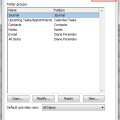
Activities is available in Outlook 2010 and older, however, only Outlook 2007 and older allow you to select the folders to search for Activities. After trying yesterday's tip, a few people couldn't see the spouse and children's birthday events on the activities tab of the associated contact.This is because the calendar is either not being indexed by Activities or you have … [Read more...] about Tip 288: Using the Activities tab
Tip 287: Enter Spouse and Children's Birthdays
When you enter a contact you can enter that person's birthday and it will show up in the calendar. What about that person's spouse and their kids - where do they get entered? Not in the Contact form. :) You could create a contact for each person - but that's confusing and a waste of a contact you'll never use. Instead, just create the calendar events for the spouse and kids … [Read more...] about Tip 287: Enter Spouse and Children's Birthdays
Tip 284: Calendar Order (Outlook 2003)
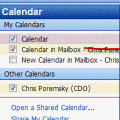
In Outlook 2003 you can display multiple calendars side by side, but how does Outlook decide the order they are shown? It's not based on the order you click the folder, but on the order they are listed in the Navigation pane, with calendars in My Calendars section listed first and Other Calendars listed last. You can control the order to some degree by reordering the list. … [Read more...] about Tip 284: Calendar Order (Outlook 2003)
Tip 283: Booklet Printing Hotfix
Duplex printing in Outlook 2003 is broken and pages are not printed as you would expect them to be for booklets. This is expected to be fixed in Outlook 2003 SP2 but if you can't wait for the release of SP2 later this fall, you can call for the hotfix. More information about the hotfix is found in //support2.microsoft.com/kb/892404 Not sure how to get a hotfix? See Tip … [Read more...] about Tip 283: Booklet Printing Hotfix