![Diane Poremsky [Outlook MVP]](http://www.outlook-tips.net/images/2014/MVP_BlueOnly.png)
In every Office 2003 application there is an item on the Help menu for "Customer Feedback Options". When you turn this on, you tell the Office team how you use their product. This feedback is then used to help prioritize development in future versions. While it's not the only criteria used, it gives the developers statistical data to refer to when making decisions on what … [Read more...] about Tip 72: Customer Feedback Tool
How to use Outlook's Command line switches

Most, if not all, of these switches will work with all versions of Outlook, including the newest version (currently Outlook 2016). Don't forget to use the correct path to your version of Outlook.exe. When you're having problems with Outlook you may be told to start Outlook using a specific command line switch. To do this: Close Outlook. At the Start menu, Run … [Read more...] about How to use Outlook's Command line switches
Tip 70: Unread message count
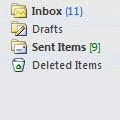
Merged Tip 805: Numbers following folder namesOutlook 2003 (and up) gives you the option to show total number of messages in the folder in green brackets "[9]" and unread message count shown in blue parenthesis "(11)".In Outlook 2013 the design changed a bit. Both unread and total message counts are blue, with total message counts in blue brackets [1609] and unread … [Read more...] about Tip 70: Unread message count
Tip 66: Outlook Newsreader
Outlook uses Outlook Express in a "news only" mode when you use the Go, News menu. If you don't like using the Go, New menu, you can create your own desktop or Quick Launch shortcuts using either of the following switches to load only the news module: "C:\Program Files\Outlook Express\msimn.exe" /newsonly "C:\Program Files\Outlook Express\msimn.exe" /outnews Right click … [Read more...] about Tip 66: Outlook Newsreader
Tip 65: Saving Custom Categories
You can save your custom Outlook categories by exporting a registry key. Outlook 2000 HKEY_CURRENT_USER\Software\Microsoft\Office\9.0\Outlook\Categories Outlook 2002 HKEY_CURRENT_USER\Software\Microsoft\Office\10.0\Outlook\Categories Outlook 2003 HKEY_CURRENT_USER\Software\Microsoft\Office\11.0\Outlook\Categories Right click on the Categories folder and choose … [Read more...] about Tip 65: Saving Custom Categories