![Diane Poremsky [Outlook MVP]](http://www.outlook-tips.net/images/2014/MVP_BlueOnly.png)
In a previous tip, I said: "As your folders (and the mailbox) grows, it tends to slow Outlook down, so while you can have 65,000 contacts, you may not want quite that many." David asks, "Okay then, what slows Outlook more, a few messages in lots of folders, or lots of messages in a few folders?"The answer is... "It depends."If you are searching for an item and know … [Read more...] about Tip 78: More Questions about Folder size and Item count
Tip 77: Easy Access to Templates within Outlook

Many users don't like to use templates because it takes too many steps to get to the template: in Outlook 2010 and up, New Items > More Items > Choose Form and browse the User Templates in File System; or in older version Tools > Forms > Choose Forms, look in User Templates in File System.Fortunately, you can store the templates in Outlook so the templates are always … [Read more...] about Tip 77: Easy Access to Templates within Outlook
Tip 76: How many items can Outlook hold?

Richard asks:Please can you advise how many contacts ( i.e. the total limit number ) that Outlook can hold?Early versions of the Exchange client supported about 16,000 items per folder. Outlook, with large table support enabled, supports about 65,000 items per folder. (Large table support is the default for new pst's created since Outlook98.) Outlook 2003 with a … [Read more...] about Tip 76: How many items can Outlook hold?
Tip 75: Sorting the Address Book Entries
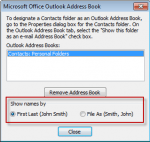
You can change how your address book entries are sorted by changing the sort order in the Address book options dialog.Your choices are "First Last" or "File as" format.To change this in Outlook 2003 and older, go to Tools, E-mail accounts, View or change existing directories or address books, Outlook Address Book, Change, Set your sort order. … [Read more...] about Tip 75: Sorting the Address Book Entries
Tip 74: Using Simple Find
Outlook has two Finds: the simple Find which displays a Find pane above your message or item lists and Advanced Find which opens the Advanced Find window. Many times, you can find what you need using the simple Find and it searches multiple folders and items types. Tips to improve your searches: Use commas to separate multiple keywords. (This OR's the keywords … [Read more...] about Tip 74: Using Simple Find