![Diane Poremsky [Outlook MVP]](http://www.outlook-tips.net/images/2014/MVP_BlueOnly.png)
Are you curious to know what the EULAs for the various Office programs and suites say? See Microsoft EULAs for a list of all EULAs. You'll need Acrobat as they are in PDF format. Good news for families with children... you can buy a copy of the student and teacher version and install it on up to three computers in your home for non-commercial use. The other versions have the … [Read more...] about Tip 52: EULAs for Office System 2003
Tip 51: Fire Reminders From Any Folder
As you are probably well aware, reminders only fire when the items is in the default folders. If you need to flag items with reminders but store them in another folder you have three options: Drag the item to a task and set a reminder on the task. Use Extended Reminder addin to fire reminders from and folder in your message store. Use Reminder Manager to fire … [Read more...] about Tip 51: Fire Reminders From Any Folder
Tip 49: Creating Advanced Filters
Outlook has a very powerful filter available to use with Advanced Find, Views, Automatic Formatting or Search Folders. You can add conditions on one or more of Filter's tabs and the conditions are joined with AND. In many fields you can use AND or OR operators within the same criteria:Name contains Sue or BillSome fields will need a comma for OR: Subject contains … [Read more...] about Tip 49: Creating Advanced Filters
Tip 48: Go To Date
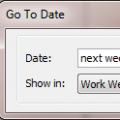
You can move around the calendar easily using Outlook's Go To Date Feature. Open Go To Date using Ctrl+G, from the Go menu or by right clicking on the Day/Week/Month Calendar and choosing Go To Date. Enter the date and the calendar format you want to view it in - one day, work week, week or month.Like many of Outlook's date fields, Go To Date accepts shortcuts including … [Read more...] about Tip 48: Go To Date
Tip 47: Merging Calendar Folders
If you have two or more calendar folders which you need to combine into one, move the items, instead of using Import. If necessary, open the message stores using File, Open, Outlook Data file, then switch to the By Category view and select the appointment and events then right-click and choose Move to folder. You could also select and drag to the other folder or right-click … [Read more...] about Tip 47: Merging Calendar Folders