![Diane Poremsky [Outlook MVP]](http://www.outlook-tips.net/images/2014/MVP_BlueOnly.png)
When you use AutoArchive, it archives items based on the modified date, not the received date. Copying and Importing will often change the last modified date, resulting in unexpected results when you attempt to archive items. To confirm the modified dates are the problem when archive fails, add the Modified Date field to your view, Right click on the field names in the … [Read more...] about Tip 33: Using Outlook's Autoarchive
Tip 32: Using Extended Characters
You can use extended characters in your messages by copying or dragging them from the Windows character map to a message. Open the character map from Start menu, Run by typing charmap. Check the Advanced View box to enable filtering options. When an Alt+ shortcut exists, a 4-digit code is listed in the lower right corner of the window. Hold Alt as you type a 4-digit code on … [Read more...] about Tip 32: Using Extended Characters
Tip 30: Burning PSTs to CD
When you backup your PSTs to a CD, you need to copy the PST to your hard drive and remove the Read-only flag before you use open it in Outlook. When copying a PST to CD, always copy it back to your drive and verify it works in Outlook before deleting the existing PST. If you use a CDRW, you can read directly from the CD. To remove the read only flag, locate the PST … [Read more...] about Tip 30: Burning PSTs to CD
Tip 29: Turning Off Compressed Weekend Days
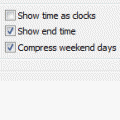
In Outlook 2003 and older, by default, the Outlook Calendar in Day/Week/Month view combines Saturday and Sunday in one cell. Disable this by right clicking anywhere on the calendar and choose Other Settings. Uncheck the option to Compress weekend days.This is a view setting and resetting the view will turn Compressed weekends back on. If you need to switch between … [Read more...] about Tip 29: Turning Off Compressed Weekend Days
Tip 28: Outlook's MRU lists
Many of the Most Recently Used (MRU) lists in Outlook can be deleted by editing the registry. Quit Outlook then open the registry editor from the Start menu, Run command by typing regedit, and then click OK.To delete the Open Other Users Folders MRU list (found in Exchange accounts only) Find the Windows Messaging Subsystem key, found here in Windows … [Read more...] about Tip 28: Outlook's MRU lists