![Diane Poremsky [Outlook MVP]](http://www.outlook-tips.net/images/2014/MVP_BlueOnly.png)

We're seeing reports that Outlook 2007 crashes when opening HTML formatted messages after IE9 is installed. It looks like the problem is specific to Outlook installed on Vista. At this time we are recommending users uninstall IE9 (or avoid installing it on Vista). You can do this from Control Panel, Programs and Features. Click on installed updates and look for the IE9 … [Read more...] about Outlook 2007 crashes after installing IE9
How to Rebuild Outlook's Search Index

If your search index is corrupt or you suspect it's corrupt, you can easily rebuild the index. There are several ways to access the Indexing options dialog: From Windows, go to the Control panel and look for "Indexing options", or start typing indexing options in the Start Search field if using Windows 7 and Vista or on the Start Screen in Windows 8. Press Enter when it … [Read more...] about How to Rebuild Outlook's Search Index
How to Hide Paragraph Formatting Marks

It seems like everyone is accidentally turning on paragraph marks lately. It's easy for many people to get into the "Show all formatting" mode and difficult for many to figure out how to get out of it. The easiest way to disable this is using the keyboard: Ctrl + Shift + 8 will toggle the formatting marks off and on. This works in all versions of Outlook (and Word). You … [Read more...] about How to Hide Paragraph Formatting Marks
Outlook 2010 keeps looking for credential tiles?
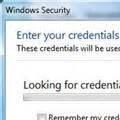
A user was unable to connect to their Microsoft Exchange using Outlook Anywhere - as soon as he enabled cached exchange mode and restarted Microsoft Outlook 2010 it hung with the "Looking For credential tiles" message. For this user, Outlook 2010 works fine without cached mode enabled. It's just when cached mode is enabled that it brings up this message. This message is … [Read more...] about Outlook 2010 keeps looking for credential tiles?
Tip 868: Display a person's current age on their birthday event in Microsoft Outlook's Calendar
A frequent request is the ability to display a person's age on their birthday event in Outlook's calendar. We used to say "you can't" and pointed users to our custom form that displays a contact's current age. We've since learned of a way to use custom fields to populate the subject field - one use of this is to add the age to the subject field of an appointment. Uses for … [Read more...] about Tip 868: Display a person's current age on their birthday event in Microsoft Outlook's Calendar