![Diane Poremsky [Outlook MVP]](http://www.outlook-tips.net/images/2014/MVP_BlueOnly.png)

"Can I get back a message I just sent?" We get many questions from users who need to retrieve a message they sent. While Outlook has a Recall function, it only works with Exchange server accounts and has a very low success rate, in part because recall only works with unread messages. Rather than using Recall, wait to send the message until you are sure you want it send it. … [Read more...] about Recalling messages in Microsoft Outlook
Tip 814: Outlook 2007 December 14 update issues
We're seeing reports of problems with Outlook 2007 following the installation of the December 14 update for Outlook 2007 (KB 2412171). A number of users are reporting performance issues with Outlook 2007 after installing the update described in KB 2412171. If you are affected you may experience slow performance when changing folders. This slowness is more … [Read more...] about Tip 814: Outlook 2007 December 14 update issues
Tip 812: Print monthly calendar without times
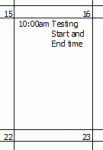
You can print a monthly calendar without end times provided the daily cells are narrow or you can disable Show end times. To disable Show end times, right click on the Calendar grid and choose Other Settings then untick the Show End time option.Whether start times display depends on your Outlook version and which updates are installed.The old trick of adjusting the … [Read more...] about Tip 812: Print monthly calendar without times
Tip 811: Super-sized fonts
We're seeing complaints about super-sized fonts - the user composed using 10 point and the recipient gets some words in 100 point. This is caused by scanning email with an antivirus scanner and the scanner removed the dot in the font size, changing it from 10.0 to 100 or 12.0 to 120. AVG 2011 gets most of the blame, but a few people said disabling other antivirus scanners … [Read more...] about Tip 811: Super-sized fonts
Tip 810: Outlook's Address Book Search
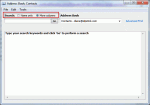
An Outlook user had this complaint: "I used to click on the address book icon and the address book would open to a nice listing of my contacts. Now I get a search box requiring me to enter a search term. How do I get my old address book format back?" Type your search keywords and click "Go" to perform a search At the top of the address book dialog are two … [Read more...] about Tip 810: Outlook's Address Book Search