![Diane Poremsky [Outlook MVP]](http://www.outlook-tips.net/images/2014/MVP_BlueOnly.png)
Unfortunately, if you use Outlook 2000 and publish a web calendar for any date after January 1, 2005, your calendar won't be correct -- all dates in the calendar published to the web are a day early, possibly because the web publishing algorithm didn't take into account that 2004 was a leap year. Microsoft is aware of the issue and investigating, however I'm not expecting a … [Read more...] about Tip 212: Outlook 2000 bug: Friday January 1, 2005
calendar
Tip 210: Printing Calendars from Public Folders
An administrator asks: I'm running Outlook 2003 in an MS Exchange 5.5 environment. One of my users posed the question of why they cannot print the daily view of a Public Folder calendar. The weekly view prints just fine but whenever, they (or even me, and I'm the owner) try to print a daily view, they get the following error message: "This folder cannot be opened because … [Read more...] about Tip 210: Printing Calendars from Public Folders
Tip 173: Print a Full Month Calendar
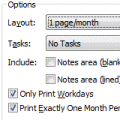
When you try to print a month that covers 6 weeks (such as October 2004), you need to use the Print Options Page Setup option of Print exactly one month per page in order for the full month to print when you include weekends.As an alternative to Outlook's calendar printout, you can use a Word template. Look for links to templates at Calendar Tools for Outlook. … [Read more...] about Tip 173: Print a Full Month Calendar
Tip 121: Bolded Dates
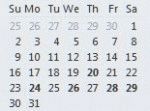
A question that comes up often is why Outlook's calendar doesn't mark all dates that contain appointments in bold in the small thumbnail calendars.This tip applies to Outlook 2010 and older. The To-Do bar in Outlook 2013 and up doesn't use bolded dates; only the thumbnail calendar in the Calendar navigation pane has bolded dates. Outlook bolds the dates that contain … [Read more...] about Tip 121: Bolded Dates
Tip 48: Go To Date
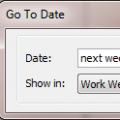
You can move around the calendar easily using Outlook's Go To Date Feature. Open Go To Date using Ctrl+G, from the Go menu or by right clicking on the Day/Week/Month Calendar and choosing Go To Date. Enter the date and the calendar format you want to view it in - one day, work week, week or month.Like many of Outlook's date fields, Go To Date accepts shortcuts including … [Read more...] about Tip 48: Go To Date