![Diane Poremsky [Outlook MVP]](http://www.outlook-tips.net/images/2014/MVP_BlueOnly.png)
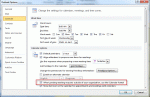
This is a fairly common problem for users who send meeting requests to Internet addresses. When we forward appointments to another employee, the employee receives a vcalendar attachment that opens as a Calendar entry on their copy of Outlook. When we send it to someone using POP3 email, the attachment is simply a forwarded email message, with the vcalendar text as the email … [Read more...] about Tip 950: Appointments are received as plain text messages
messages
Tip 920: What is "Clean Up Folder"?
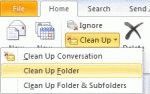
An Outlook 2010 user wondered what Clean Up folder does: What is "Clean Up Folder" and how does it compare to "Empty Folder"? Empty Folder empties the folder (Deleted Items and Junk email), with the messages permanently deleted. You cannot easily recover them. Clean up Folder moves all redundant messages in the current folder to the designated "Cleanup" folder. These … [Read more...] about Tip 920: What is "Clean Up Folder"?
Using Wordmail in Office 2010
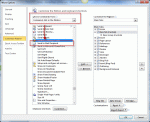
A selling point of early versions of Office was "wordmail" where, with the click of a button, an email header was added to the Word document or Excel file. All you need to do was address it and click the Send a Copy button and the document was sent in the body of a message, not as an attachment. To enable it in Office 2010 applications, you need to customize the Quick Access … [Read more...] about Using Wordmail in Office 2010
Tip 887: Create a rule to delete messages after a week
When you want to delete messages after a period of time you have you have three options: Use Autoarchive Create a Rule and use Run Rules Now Use to a rules replacement tool such as Auto-Mate that runs its own rules later Autoarchive works great to delete old mail, empty deleted items, or the junk email folder. Set it to run frequently and to permanently delete … [Read more...] about Tip 887: Create a rule to delete messages after a week
Icons found in the Inbox, Message Headers, and Toolbars

On this page we have the icons you may see in your Inbox, Sent folder, or in the message header in Outlook 2013 and above.Outlook 2013 aims for a cleaner look and many default icons, such as read and unread envelopes are gone. In the case of Unread, the envelope was replaced by a blue bar to the left of the message. Mail | Calendar & Tasks | Contacts & … [Read more...] about Icons found in the Inbox, Message Headers, and Toolbars