![Diane Poremsky [Outlook MVP]](http://www.outlook-tips.net/images/2014/MVP_BlueOnly.png)
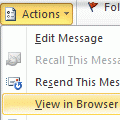
Printing in Outlook sucks. But if the message is in HTML format, not all is lost. Open the message, click Other Actions button and choose View in Browser. Now you can print the message using the browser's much better print options, such as controlling the pages you print or printing a selection.As with all workarounds, there is one potential drawback - you won't have an … [Read more...] about Tip 404: Printing Workaround in Outlook 2007 (and up)
outlook
Outlook's Reply to All includes my own address
Outlook Tip 374: Reply to AllTravis had this question: I was wondering; is there a way to automatically strip your own email address when doing a "Reply All." Seems every time I get an email sent to me and someone else a Reply All always wants to send me a copy of the message I'm composing. This should only happen with Outlook 2002 and previous versions, and only when you … [Read more...] about Outlook's Reply to All includes my own address
Tip 308: Check Every Minute?
How frequently should Outlook check for new mail on the server?For optimal service in both Outlook and on the mail server, no less than 8 - 10 min, longer if you use a dial-up account. Be kind to your email provider - every min or two is too frequent!Thanks to changes in versions of Outlook released since the initial publication of this tip in 2005 and faster Internet … [Read more...] about Tip 308: Check Every Minute?
Tip 259: Calendar display looks wrong
How can I get calendar to start on the current date?This is just how Outlook works. Outlook displays the calendar as 5-full weeks and the last few days of the previous month will always be at the top, unless the month starts on the first day in your calendar display.If you turn off compressed weekends (right click on the calendar and choose Other Settings to disable the … [Read more...] about Tip 259: Calendar display looks wrong
Tip 252: Saving a PST to CD
After replacing two servers last week, I think I'm caught up on my work that'll I'll be able to get back on track with 3 tips each week. I hope.If not, just call me Slacker. :) When you burn a pst to a CDR, Outlook can't read it directly from the CDR because it needs read/write access to the pst, even if you are only going to read, not change, any items in the pst. You will … [Read more...] about Tip 252: Saving a PST to CD