![Diane Poremsky [Outlook MVP]](http://www.outlook-tips.net/images/2014/MVP_BlueOnly.png)

As of iCloud 2.1.1 (Dec 2012), the iCloud data file can't be set as default.The release of iOS6 brought iCloud2 and a better experience in Outlook. The iCloud doesn't work with Outlook 2013 yet (expect an update after Office 2013 is released to manufacturing and available to the general public), but users who wanted to set the iCloud data file as default get their wish, as … [Read more...] about Tip 1026: Outlook, iCloud2 and the default data file
outlook
Tip 1025: Postage Stamp Windows
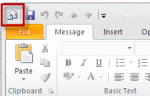
I've seen a rash of complaints lately that the compose mail window in Outlook is the size of a postage stamp. While not common, and seen less often in recent years, it is a sign that Outlook (and the computer) recently had problems with resources - usually too many windows open and not enough memory.Resizing the window, closing it then reopening it will fix it. Do not … [Read more...] about Tip 1025: Postage Stamp Windows
Tip 1019: Using date shortcuts to create a series of appointments

The scenario: you need to schedule 6 appointments in an "uneven" series, where each follow-up appointment has it's own schedule. For example, the first appointment is Day 1, the second is Day 3. The third appointment is in 2 weeks, the 4th in 6 weeks, then they are at 24 weeks, 12 months, and 24 months. Can Outlook do this type of schedule? Yes, but not using recurrences. … [Read more...] about Tip 1019: Using date shortcuts to create a series of appointments
Tip 1017: Using Outlook and Onenote Together
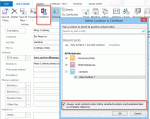
A user was complaining about syncing Contacts between Outlook, Hotmail, and iPhone. She often adds long notes to contacts but Hotmail only supports 1024 characters. My suggestion: OneNote, with the notebook stored in SkyDrive. You can easily link Outlook Contacts to a OneNote notebook, with one page for each contact you link to OneNote. You can copy a hyperlink to the page … [Read more...] about Tip 1017: Using Outlook and Onenote Together
Tip 1013: Can you use OneDrive, DropBox or other cloud storage for pst files?

I've had several people ask about moving their pst file to OneDrive and similar cloud-based services.Sorry, no can do. It won't work and could result in a corrupt data file.Outlook puts a lock on the pst file when the pst file is open. OneDrive continually syncs the local folder. It won't be able to sync correctly when Outlook is open because Outlook has a lock on the … [Read more...] about Tip 1013: Can you use OneDrive, DropBox or other cloud storage for pst files?