• Skip to main content
  • Skip to primary sidebar
  • Skip to footer

Outlook Tips

Learning Microsoft Outlook One Tip At A Time

Diane Poremsky [Outlook MVP]

  • Home
  • Tips Archive
  • How to...
  • Beginner
  • Outlook.com

Bugs in Outlook's June 13 2017 security update

An Outlook 2010 user reports:

Windows just updated Outlook with many updates and now I cannot open any attachments. I now see one of two dialogs when I try to open or save contacts, tasks, etc. One dialog is the "unsafe attachment" warning when I close and item; the other tells me the attachment was added by Outlook and Outlook is not installed: "The program used to create this object is Outlook. The program is not installed on your computer. To edit this object, you must install a program that can open the object." The attachments are other office documents and pdfs and I'm opening the attachments from within Outlook, so it's definitely installed.

error message when opening attachments

This is caused by the June 13 2017 update for Outlook 2010. Outlook 2007 is also affected, but Outlook 2013 and 2016 escaped this bug. Microsoft is investigating it and at this time, the only solution is to uninstall the update.
Description of the security update for Outlook 2010: June 13, 2017

The June 13 2017 updates causes other issues with attachments affecting Outlook 2007, 2010, 2013 and 2016: when you open an attachment, you may get the "open or save" dialog when you didn't previously.
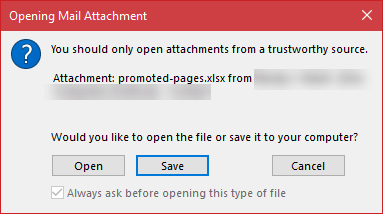
unsafe attachments

There is one (previously) known issue: if a message whose subject ends with a file extension that is on the unsafe extension list, the message will be blocked as an unsafe file type. You need to save the message to the hard drive and rename it, then attach.

Complete list of Office updates released on June 13, 2017:
June 13, 2017, update for Microsoft Office

Published June 15, 2017. Last updated on June 16, 2017.
Share this:

  • Twitter
  • Facebook
  • LinkedIn
  • More
  • Print
  • Tumblr
  • Reddit
  • Pocket
  • Pinterest

Related posts:

This tip applies to Outlook 2007 and older. The procedure is slightly different in Outlook 2010. See Editing Attachments in OutlooTip 43: Save Changes to Attachments Receiving Read Only Attachments A reader asks: "Every attachment I receive is marked "read-only" by default in OutlQuestions about Read Only Attachments If you use Office 2003 and installed the updates released over the last couple of days and are now experiencing problems, try uninTip 351: Office 2003 and a Bad Update Set the registry keyOutlook 2010 runs in Safe Mode after Update
Subscribe
Notify of
6 Comments
Newest
Oldest Most Voted
Inline Feedbacks
View all comments

Primary Sidebar

Search OutlookTips

Training and one-on-one assistance

Do you need help setting up Outlook or want some one-on-one training? I'm available for hire. See Training and one-on-one assistance for fees and to check availability.

All-Time Most Popular Posts

  • Windows 7 and Vista Start Search field
    How to start Outlook in safe mode
  • outlook.com icon
    Delete a message stuck in Outlook's Outbox
  • How to use Outlook's Command line switches
  • Use Cleanviews switch to reset all views
    How to Reset the View on Outlook folders
  • Where are my Outlook Files?
  • Folder paths
    How to Find Folder Paths in Outlook Mailboxes
  • How to use Scanpst.exe to repair Outlook data files
  • Outlook's Missing Holidays
  • backstage page
    Where is File tab in Outlook?
  • Icons found in the Inbox, Message Headers, and Toolbars

Footer

Recent Posts

  • Log into multiple Outlook on the web accounts
  • Keeping Hackers out of Microsoft accounts
  • Microsoft Account Closure Email
  • Outlook on the web Quick Actions moved to the right
  • Automatically sign out of Outlook.com

Recent Bug List

Microsoft keeps a running list of issues affecting recently released updates at Fixes or workarounds for recent issues in Outlook for Windows.

Office Update History

Update history for supported Office versions is at Update history for Office

Resources

Ask questions and share your knowledge in Outlook Forums.

You Might Like

Where is File tab in Outlook?
Using Two-factor authentication
Where are my Outlook Files?
How to use Outlook's Command line switches

© 2003–2026 ยท Outlook Tips

wpDiscuz
You are going to send email to

Move Comment