![Diane Poremsky [Outlook MVP]](http://www.outlook-tips.net/images/2014/MVP_BlueOnly.png)
Do you have two dates listed on each calendar square, one on the left and one on the right? If so, it means you have an alternate calendar enabled. To disable it (or check it out), go to Tools, Options, Calendar Options and toggle the checkmark for Enable alternate calendar. … [Read more...] about Tip 352: Alternate Calendars
Tips Archive
Tip 351: Office 2003 and a Bad Update
If you use Office 2003 and installed the updates released over the last couple of days and are now experiencing problems, try uninstalling this update: //support2.microsoft.com/kb/908531 Among the symptoms are the inability to open files using the File, Open menu (or save using File, Save) and "Word is unavailable..." error message when it's set as the email editor. For … [Read more...] about Tip 351: Office 2003 and a Bad Update
Tip 350: Missing Export Menu
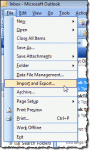
Eric asks: I'm trying to find out how to export my calendar in an excel format. Right now I have to transcribe everything from the Outlook calendar to excel. Is there an easier way?Hmmm... it sounds like you are missing the File, Import and Export command.This is a common problem with BCM and possibly other add-ins. (I don't know why, although I'm guessing it's … [Read more...] about Tip 350: Missing Export Menu
Tip 349: Move, Copy or Import?
Following yesterday's tip about merging calendars, several people asked why I didn't recommend using Import and Export. I didn't mention it because it's bad. Easy yes, but it has too many drawbacks and its use is discouraged under most circumstances. Import and Export are bad because: Only visible Outlook items are processed. If you have custom views, custom forms or … [Read more...] about Tip 349: Move, Copy or Import?
Tip 348: Merging Calendars
This is (to me anyway) a problem with a very obvious solution, but judging by the number of questions asked about it, it's not nearly as obvious as I think it is. George asks: I have just done a complete re-install of Win XP Pro (SP2) on my system. I am using Outlook 2003 & have opened the old outlook.pst file & brought [the items] in to the re-installed version of … [Read more...] about Tip 348: Merging Calendars