![Diane Poremsky [Outlook MVP]](http://www.outlook-tips.net/images/2014/MVP_BlueOnly.png)
Manjunatha suggested this tip: You can copy some text (might be from Excel, Word, Powerpoint, or even some old mail) into new mail. 1. Copy the selection2. Move to the Inbox3. Press Shift+Ins Note: this works not only for mail but for any Outlook item - select the folder and press Shift+Ins to create a new item of the folder type using the contents of the clipboard. You can … [Read more...] about Tip 360: Copy Text Into New Messages
Tips Archive
Tip 356: Resetting Views
A user had this problem: I am currently working on a problem regarding a filter applied to a specific e-mail folder in Microsoft Outlook. It appears that the folder has a filter applied to it but when I check the properties, it shows nothing regarding keywords. Also, there are only 11 e-mail messages showing on the screen, and 121 are supposed to be in … [Read more...] about Tip 356: Resetting Views
Tip 355: Calendar History

David wants to know:How far back in history will an Outlook\Exchange calendar go?It goes back as far as you want it to go. If AutoArchive is enabled, you can configure it to either delete or archive old calendar items as they age. If you are on an Exchange server, the administrator may have the server configured to delete old items using Exchange server's Mailbox … [Read more...] about Tip 355: Calendar History
Tip 354: Changing Quick Flag Colors
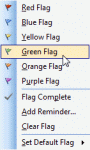
A reader asks:Is it possible in Outlook 2003 to add new flags so that I got more than the standard ones and can I change the colors of the flags?Sorry, no. Outlook 2003 doesn't allow you to change flag colors or add more flags. The only thing you can do is create a Flag toolbar and change the button labels to help you remember what you're using the flag … [Read more...] about Tip 354: Changing Quick Flag Colors
Questions about Read Only Attachments
Receiving Read Only Attachments A reader asks: "Every attachment I receive is marked "read-only" by default in Outlook. Is there a way to remove the default of read-only that is attached to all incoming email? I do not want to have to open every email before saving it. I have poked around but can't seem to find the necessary setting that I can change." … [Read more...] about Questions about Read Only Attachments