![Diane Poremsky [Outlook MVP]](http://www.outlook-tips.net/images/2014/MVP_BlueOnly.png)
"I would like to be able to link a folder to a contact in outlook. I have been able to place a shortcut (or hyperlink) to particular files but I want a shortcut to a folder in the contact notes section. Is this possible?" Windows folder or Outlook folder? Outlook folder: Show the Web toolbar – select the folder and look in the address field of the toolbar. Copy and paste … [Read more...] about Tip 206: Create links to folders
Tips Archive
Tip 205: Internet Favorites in Outlook 2003
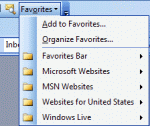
A reader asks "Is there a way to have the "Favorites" (the Internet Explorer "Favorites") show up again in both Word and in Outlook, like it did in Office 97?" Open the Tools, Customize dialog, look on the Commands tab and locate the Favorites command under Menu bar category - drag it to the menu or toolbar location where you want to place it. Ignore the Favorites … [Read more...] about Tip 205: Internet Favorites in Outlook 2003
Tip 203: Attach Incoming Mail to a Contact

I have Office 2003 and I have a question about Outlook. Is there a way to attach an incoming email to a contact like you can in ACT! I want to try to avoid making a folder and just attach it to the contact.Yes! Just create a contact for the sender. When you open the contact and look on the Activities tab, you'll see a history of the messages sent to or received from … [Read more...] about Tip 203: Attach Incoming Mail to a Contact
Tip 202: Publishing Custom Forms Questions
Q: I tried the date form sample on your site and it doesn't work. A: Forms containing scripts must be published. This prevents someone from sending you a form containing virus-like scripts. The scripts won't work unless you publish the form. You won't be warned that it needs to be published, so if a form (or template) doesn't work as expected, try publishing it. Q: Where … [Read more...] about Tip 202: Publishing Custom Forms Questions
Tip 201: Add Addresses to a Distribution List
Do you want to make a Distribution list using a list of addresses found in another file? While the recommended method is to import the addresses to contacts and assign categories so you have an easy to manage dynamic DL, you can easily copy and paste the addresses into a DL form.The addresses need to be in semi-colon delimited format or one address per line.Open a new … [Read more...] about Tip 201: Add Addresses to a Distribution List