![Diane Poremsky [Outlook MVP]](http://www.outlook-tips.net/images/2014/MVP_BlueOnly.png)

I’m seeing more users complain that meeting invitations won't send. Email sends just fine, but meeting requests are stuck in the Outbox. Because some items send, it's not the SMTP server or authentication issues, both of which are the usual suspects when mail won't send.While certain add-ins are known to cause stuck messages, these recent incidents are caused by the Norton … [Read more...] about Tip 1116: Meeting invitations are stuck in the Outbox
Tips Archive
Tip 1115: Contact's Phone number formatting

I'm using MagicJack and it requires that all numbers have an area code, but no +1. I figured out how to require the area code for my home location, but is there a way to eliminate the +1 on all area codes other than setting up area code rule for each area code? Sure.The default setting is no country code is added, so when you type 2025551212 into the number field, the … [Read more...] about Tip 1115: Contact's Phone number formatting
Change Outlook's Blue Icon

Not everyone likes Outlook's new blue icon. They want the yellow icon back.Where did the yellow icon go for Outlook? It's confusing me everyday.Users don't like the new blue icon because it's not instantly recognizable as Outlook. It's blue, not yellow, and it looks like Word's icon, or Lync. Not Outlook. Users need to pay a little more attention to the actual icon; … [Read more...] about Change Outlook's Blue Icon
Tip 1113: Icons missing in Outlook 2013?

The envelope will not appear in the screen unless I reply or forward to an email. I removed the icon column and added it back in. I removed all add-ins and that did not work either.It's not an addin or corrupt view that removed the icon and you can't "fix" it. It's the new Outlook look, with minimal distractions. In Outlook 2013, Unread messages have a vertical bar on … [Read more...] about Tip 1113: Icons missing in Outlook 2013?
Tip 1112: Control which Appointments are shown in the To-Do Bar
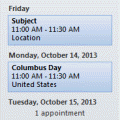
One fairly common question from Outlook users with multiple email accounts or iCloud is how to get their appointments to show on the To-do Bar.Outlook's To-do Bar (and Calendar Peek) display appointments in the user's default calendar. If you want it to display appointments from a different calendar on your To-Do Bar, you either need to set the Calendar's data file as your … [Read more...] about Tip 1112: Control which Appointments are shown in the To-Do Bar