![Diane Poremsky [Outlook MVP]](http://www.outlook-tips.net/images/2014/MVP_BlueOnly.png)
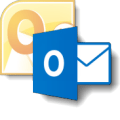
Not everyone likes Outlook's new blue icon. They want the yellow icon back.
Where did the yellow icon go for Outlook? It's confusing me everyday.
Users don't like the new blue icon because it's not instantly recognizable as Outlook. It's blue, not yellow, and it looks like Word's icon, or Lync. Not Outlook. Users need to pay a little more attention to the actual icon; they can't quickly click on an icon based on color alone. (And yes, a lot of people quickly click based on icon color.)
 When you use large icons in the taskbar, the icons are about this size and you can't click the button based only on color. (It helps if you pin the icons to the taskbar and don't place them next to each other. When pinned, the icons are always in the same position on the taskbar.)
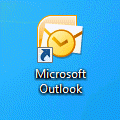
Good news! You can change the icon used in the Outlook shortcut on your desktop or in the Taskbar. You can revert to the Outlook 2010 icon or use a yellow version of Outlook 2013 icon. If you don't like these icons, you can use any icon you want.
Note: this method won't change the icon on the Windows start screen. However, you can pin the yellow icon to the Start screen, as well as to the Taskbar.
All users: when Outlook is open, the open icon may be blue *unless* you configured the taskbar Properties to "combine". If you use "Always combine, hide labels", the icon is always yellow, otherwise, it's yellow when combined. Pinning to the Start screen may use the blue icon.

Download my yellow icon files (contains both the older Outlook 2010 icon and my yellow Outlook 2013 icon) or locate the icon file you want to use. If you use my icon files, I recommend placing them in a folder where you won't forget what they are used for and accidentally delete them. I placed my icon file in the Office directory at C:\Program Files\Microsoft Office.
Step 1: Create a desktop shortcut for Outlook
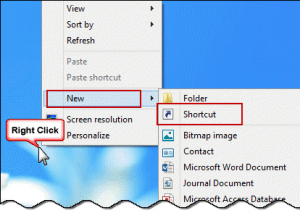
Create an Outlook shortcut on your desktop: right-click on the desktop, choose New > Shortcut.
Browse to locate Outlook.exe. Select it, then click OK and Next. Enter a name for your shortcut then complete the wizard.
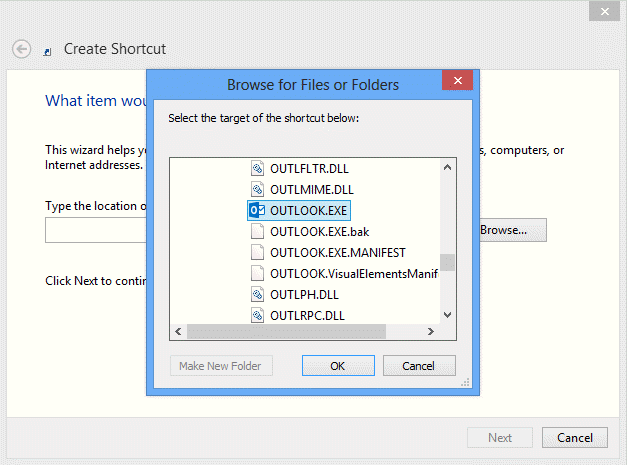
Outlook 2016, 2019, 2021, and 365 path is
"C:\Program Files\Microsoft Office\root\Office16\OUTLOOK.EXE"
If you have the 32-bit version of Office installed on 64-bit Windows, Outlook is at
"C:\Program Files (x86)\Microsoft Office\root\Office16\OUTLOOK.EXE".
If you are using Office 2013 click-to-run versions, the path to Outlook is "C:\Program Files\Microsoft Office 15\root\office15\OUTLOOK.EXE".
In Office 2013 ProPlus, the path to Outlook is "C:\Program Files\Microsoft Office\Office15\OUTLOOK.EXE"
Note: When using 32-bit Office on 64-bit Windows, Office is in the 32-bit program files path at \Program Files (x86)\.
Step 2: Change the icon
- Right click on the newly-created desktop shortcut and choose Properties.
- Click Change Icon and browse to and select the icon file.
- Click Ok to apply to new icon to the shortcut.
Step 3: Change the icon used with Pin to Taskbar
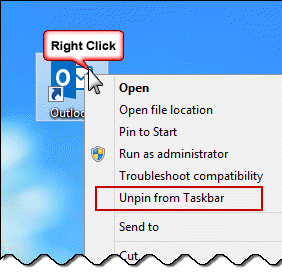
If Outlook is pinned to the taskbar, the icon isn't updated automatically. You'll need to unpin it, then re-pin it.
- Right click on the desktop shortcut and choose Unpin from Taskbar.
- Right click again and choose Pin to Taskbar.
- If you want the yellow icon on the Start screen, right click on the icon and choose Pin to Start. You may want to unpin the blue icon first.
 A new Outlook icon and the new message indicator in my taskbar:
Change Outlook 2013's icon video tutorial
Published October 25, 2013. Last updated on April 21, 2022.