![Diane Poremsky [Outlook MVP]](http://www.outlook-tips.net/images/2014/MVP_BlueOnly.png)
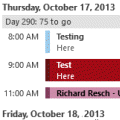
Among the issues that the Outlook 2013 hotfix that came out this week addresses is one that annoys many users: the Calendar Peek displays appointments for the selected day only, not the next several appointments.No more! The hotfix restores the behavior of the Calendar Peek to the behavior users were used to with the To-do Bar in older versions, displaying appointments on … [Read more...] about Tip 1111: Outlook 2013 hotfix: Calendar peek and more
Tips Archive
Tip 1109: Show the BCC field in Outlook
Outlook doesn't display the BCC in message forms by default, but you don't really need to see the BCC field to use it.Simply click the To button (1 in the screenshot), then select a name from your address book and click the button next to the BCC field or type an address into the BCC field. When you click Ok and return to the message, the BCC field will display in the … [Read more...] about Tip 1109: Show the BCC field in Outlook
Tip 1108: Add meeting requests to Calendar as Tentative
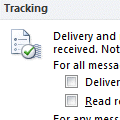
I have a user who is managing several calendars on her Outlook. When she sends a meeting request to the users, she can see the appointments updated on her screen in those respective calendars except for one. One shared calendar doesn't update until the user manually accepts it in his Outlook. How can I solve this?Check the user's auto-accept settings in File, Options, … [Read more...] about Tip 1108: Add meeting requests to Calendar as Tentative
Tip 1107: Outlook's Touch Mode
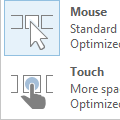
The Office 2013 and above applications have a Touch/Mouse Mode command available on the QAT. When Touch mode is enabled, the buttons on the ribbon are a little roomier, the menus as little wider.To display the Touch/Mouse Mode command on the Quick Access Toolbar (QAT), expand the QAT menu and select Touch/Mouse Mode. … [Read more...] about Tip 1107: Outlook's Touch Mode
Tip 1106: Outlook's Restore Window button doesn't work?
A surprisingly common problem is Outlook appears to be stuck with the window either Minimized or Maximized. When the Restore button is clicked, Outlook disappears.When I start Outlook, it starts minimized. It never starts maximized. When I try to Restore the window by clicking on the icon between the minimize button and the close application button, the entire program … [Read more...] about Tip 1106: Outlook's Restore Window button doesn't work?