![Diane Poremsky [Outlook MVP]](http://www.outlook-tips.net/images/2014/MVP_BlueOnly.png)
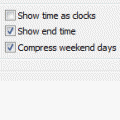
In Outlook 2003 and older, by default, the Outlook Calendar in Day/Week/Month view combines Saturday and Sunday in one cell. Disable this by right clicking anywhere on the calendar and choose Other Settings. Uncheck the option to Compress weekend days.This is a view setting and resetting the view will turn Compressed weekends back on. If you need to switch between … [Read more...] about Tip 29: Turning Off Compressed Weekend Days
Tips Archive
Tip 28: Outlook's MRU lists
Many of the Most Recently Used (MRU) lists in Outlook can be deleted by editing the registry. Quit Outlook then open the registry editor from the Start menu, Run command by typing regedit, and then click OK.To delete the Open Other Users Folders MRU list (found in Exchange accounts only) Find the Windows Messaging Subsystem key, found here in Windows … [Read more...] about Tip 28: Outlook's MRU lists
Tip 27: Attachments and the SecureTemp Folder

When you open attachments on email directly from Outlook, a copy is written to a temporary folder on your hard drive. This is so that the virus scanner can check it before it is opened. The folder Outlook uses is under the temp internet folders. This offers more security as only your user account and the computer administrator account can view the files under this folder. The … [Read more...] about Tip 27: Attachments and the SecureTemp Folder
Tip 26: Changing the Default Attachment Directory

Outlook always uses the My Documents folder as its initial Look in location when you save or send attachments. While utilities exist that can change the location, the changes apply to all programs that use the My Documents folder.Instead of browsing to the folders you use often, add it to the Places bar (Office 2000 and up) and the folder is just one click away.Browse … [Read more...] about Tip 26: Changing the Default Attachment Directory
Tip 25: Sharing Contacts
By selecting a checkbox, you can share your Outlook 2000 contacts with the Windows Address Book when you use Internet Mail mode. If your version of Outlook doesn't have the checkbox in the interface, you can share the contacts by setting a registry key. It works with all versions of Outlook, including Outlook 2003 and with Exchange server accounts. Two gotchas are: It … [Read more...] about Tip 25: Sharing Contacts