![Diane Poremsky [Outlook MVP]](http://www.outlook-tips.net/images/2014/MVP_BlueOnly.png)
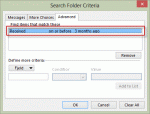
An Outlook user wanted to know how to create a custom search folder.I need a search folder which displays large e-mails received more than 3 months ago. I know how to find bulk e-mails, but what about old e-mails? I tried to filter using the "received" field, but there are no standard conditions that meet my purpose. I don't need "last week" or "last month" and while "on … [Read more...] about Tip 1053: Create a Search folder to find older messages
Tips Archive
Understanding Tasks and To-Do List
Please note that this page refers to the To-Do List at the top of the Tasks module in Outlook desktop. This article was originally written in 2012, long before Microsoft created the new To-Do app, which is a new interface to Outlook Tasks.I had a couple of questions about the To-Do List and Task List recently. The users were confused about the differences between the two … [Read more...] about Understanding Tasks and To-Do List
Tip 1051: Send meeting details in an email
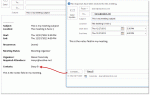
After several questions over the last couple of weeks asking how to send a plain text meeting request, I thought it was time to write up a tip on the subject.Why would you want to do this? Most users want to forward a copy of their appointments to a cell phone or their personal address but only need the details in a text message format, not a meeting request or … [Read more...] about Tip 1051: Send meeting details in an email
Disable reminders in Microsoft Outlook
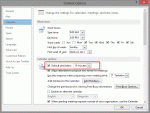
With the holidays approaching and with what seems like everyone taking the last week of the year off, it's a good time to review Outlook's reminder settings.There are several different methods you can use to disable reminders, depending on what your goal is.Do you want to stop adding reminders to new appointments and meetings?If so, you can turn reminders off in … [Read more...] about Disable reminders in Microsoft Outlook
Tip 1048: 'Too many devices' error with Hotmail and Outlook.com accounts
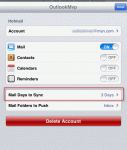
Some Hotmail and Outlook.com users who have their accounts configured in Outlook 2013 are receiving an error message saying that there are too many devices connected:There are too many devices syncing with this account. To sync using Outlook, try removing another device that is connected with this account such as a phone or another computer.This error is caused by … [Read more...] about Tip 1048: 'Too many devices' error with Hotmail and Outlook.com accounts