![Diane Poremsky [Outlook MVP]](http://www.outlook-tips.net/images/2014/MVP_BlueOnly.png)
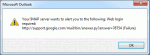
This bug is the result of Outlook opening too many connections to the IMAP server. Gmail sets a limit to the number of connections that can be opened and Outlook wants more. This will be fixed in RTM. Until then, the best solution is to remove the account from the Send and Receive Settings as described below. Outlook 2013 users discovered an annoying bug when they have a … [Read more...] about Tip 1015: Outlook 2013 and the annoying Gmail IMAP error
Tips Archive
Tip 1014: Facebook profile photo warning

How many of you are aware that when you change your Facebook profile photo to something goofy, funny, suitable for friends only, mildly offensive, or downright scary that anyone who uses Outlook and has a Facebook account configured in the social connector can see your profile photo when you send them an email message? While it's generally not an issue when you are emailing … [Read more...] about Tip 1014: Facebook profile photo warning
Tip 1013: Can you use OneDrive, DropBox or other cloud storage for pst files?

I've had several people ask about moving their pst file to OneDrive and similar cloud-based services.Sorry, no can do. It won't work and could result in a corrupt data file.Outlook puts a lock on the pst file when the pst file is open. OneDrive continually syncs the local folder. It won't be able to sync correctly when Outlook is open because Outlook has a lock on the … [Read more...] about Tip 1013: Can you use OneDrive, DropBox or other cloud storage for pst files?
Tip 1011: Sent Items folder shows my name, not who the message was sent to
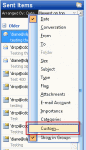
I get a lot of questions asking how to fix the Sent Items folder when it shows the From column instead of the To column. This is useless since you know who the message is from and want to see who it was sent to. When this happens, you need to Reset the view on the folder. In Outlook 2010 and 2013, switch to the View ribbon and click Reset View. In Outlook 2007 and … [Read more...] about Tip 1011: Sent Items folder shows my name, not who the message was sent to
Tip 1010: Send as an attachment doesn't include message text
Several users have discovered that when they use the File, Send as Attachment command in another application, only the attachment is sent, not the message body they typed in.Others may notice that when they begin to compose a message then save it to drafts, when the user reopens and edits it, then immediately sends it, the original version in drafts may be sent, not the … [Read more...] about Tip 1010: Send as an attachment doesn't include message text