![Diane Poremsky [Outlook MVP]](http://www.outlook-tips.net/images/2014/MVP_BlueOnly.png)

An Outlook user had a question about how to save sent messages in other folders: Imagine this scenario: after you send an email, a window pops up so you can select a folder to store the sent message in. Is it possible? Sure. You have three options: You can use the Save sent message command on the options ribbon to select a folder. The button lists the most … [Read more...] about Tip 937: Select the Folder to Save Sent Email in
Tips Archive
Tip 936: Hide Completed Tasks in Outlook Today
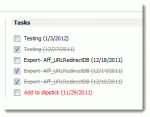
An Outlook user wanted to know how to remove completed Tasks from the Outlook Today screen. Obviously, deleting the tasks will remove them from Outlook Today, but if you want to keep the task, you can give it some time as the completed tasks are removed automatically as they age. Tasks completed "today" will display on Outlook Today for the rest of the day, disappearing … [Read more...] about Tip 936: Hide Completed Tasks in Outlook Today
Tip 935: Dismissing Reminders on Recurring Tasks

With the holiday season beginning, I thought it would be a good time to share this tip. A user on our Outlook-users mailing list asked how to prevent reminders from disappearing from tasks: I have several daily reminders of various tasks I have to do. What normally happens after I return from a vacation, is Outlook will pop up a reminder for the first day I miss, but … [Read more...] about Tip 935: Dismissing Reminders on Recurring Tasks
Tip 934: Separate Email from Multiple Accounts into New Folders
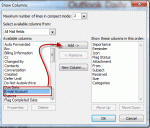
When I set up my email accounts, they all went into one Inbox. I set up separate Inbox folders for each and the new emails are coming in correctly, but how do I get the emails I downloaded first separated into the 5 correct Inboxes? I have 1500 messages, so it's not feasible to look at each one to separate them. It's actually very simple to sort them. Create a custom view … [Read more...] about Tip 934: Separate Email from Multiple Accounts into New Folders
Tip 933: Display the Total Number of Members in a Contact Group
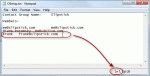
A user wanted to know if Outlook can display the total count of members of a Contact Group (distribution list). Yes, this is possible. Open the Contact Group and click Forward > In Internet Format. This creates a new message with the contents of the DL in a text file. Double click on the attachment (named "group_name.txt") to open the file then go to the View menu, … [Read more...] about Tip 933: Display the Total Number of Members in a Contact Group