![Diane Poremsky [Outlook MVP]](http://www.outlook-tips.net/images/2014/MVP_BlueOnly.png)
Users who create templates in Outlook 2010 are discovering that the resulting messages are converted to plain text when sent using a SMTP server. (Users with Exchange servers are not affected.) We have two solutions until this bug is fixed. I think the easiest fix is to save the design as Stationery instead of a template. The first time its used, select it from New … [Read more...] about Tip 823: Templates are converted to plain text messages
Tips Archive
Tip 822: How to print a 5 week calendar
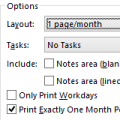
Would you like to print a "monthly" calendar that runs mid-month to mid-next-month? Begin by adjusting the monthly calendar so it displays the first week you want printed at the top of the screen. Next, open the print dialog. If you see a full month in print preview, go to Page Setup and uncheck the option to print exactly one month per page.In Outlook 2010 and 2013, … [Read more...] about Tip 822: How to print a 5 week calendar
Tip 820: Printing Contacts on one page
Older versions of Outlook had an option that allowed you to print multiple items on one page in a continuous fashion. This allowed you to save paper while printing the complete items. The option to do continuous printing was removed from Outlook 2007 and 2010 and the Memo style forces each item on a separate sheet of paper To reduce the amount of paper used, you can choose … [Read more...] about Tip 820: Printing Contacts on one page
Tip 819: Undo accidental changes
A user asked“I was trying to categorize some messages and when I right clicked "Categorize", I selected the category then realized I removed the category. How can I undo this mistake?”There is no undo command for accidentally removing categories, but if the items are still selected, reselecting the category will restore them to the items. If it’s too late for … [Read more...] about Tip 819: Undo accidental changes
Tip 818: Showing more (or fewer) navigation calendars
You can show more navigation calendars in the To-Do Bar on the right or in the Calendar navigation pane on the left. To change the number of calendars visible on the To-Do Bar, right click on the To-Do Bar title and choose Options from the menu and change the number of calendars shown. (In Outlook 2010, right click above the navigation calendars where a title bar would be, if … [Read more...] about Tip 818: Showing more (or fewer) navigation calendars