![Diane Poremsky [Outlook MVP]](http://www.outlook-tips.net/images/2014/MVP_BlueOnly.png)
From the “Stupid things Marketing thinks up” file: In response to a user who couldn’t understand why Outlook wasn’t working, someone from Microsoft Support had this to say "When we install Office Home and Student 2010, Office 2010 Professional will also be installed as a trial (it is Optional)." Yes, that’s right, when someone buys Office 2010 Home & Student edition … [Read more...] about Tip 771: Home & Student Buyers Beware
Tips Archive
Tip 770: Outlook 2010 & Blackberry
The new BlackBerry Desktop Manager is now available. It works with all 32-bit versions of Outlook, including Outlook 2010. It will not work with 64-bit Outlook 2010. Users who choose Outlook 2010 64-bit can expect an update early next year. Download link:https://www.blackberry.com/Downloads/entry.do?code=A8BAA56554F96369AB93E4F3BB068C22 For possible workaround with Outlook … [Read more...] about Tip 770: Outlook 2010 & Blackberry
Tip 769: Crash on Reply or Forward
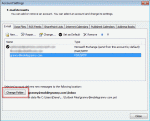
I’ve heard a lot of complaints about Outlook 2010 crashing on a reply or forward. This is caused by not having a folder set as the default delivery location for the account.With Outlook closed, go to Control panel, Mail and select Show Profiles.Select your profile and click Properties button, then E-mail Accounts.On the E-mail tab, select your POP3 account, and … [Read more...] about Tip 769: Crash on Reply or Forward
Tip 768: OL2007: Line Wrap in Calendar Printout
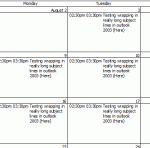
NoteThis bug was (finally) fixed by the January 2011 update. If Outlook is fully updated, lines should wrap properly in a printed monthly calendar. In older versions of Outlook, users could print a monthly calendar and long subjects wrapped to multiple lines. This was broken in Outlook 2007 – if you wanted the subject to wrap, you needed to use the Calendar Printing … [Read more...] about Tip 768: OL2007: Line Wrap in Calendar Printout
Tip 766: Map an address

Outlook 2010 uses Bing maps to map address but you can change it to other popular mapping services by editing the registry. Open the registry editor and browse to Outlook 2010: HKEY_CURRENT_USER\Software\Microsoft\Office\14.0\Outlook\Options\General Right click and choose New, String Value. Enter MapScriptURL for the string value name. Double click on the MapScriptURL … [Read more...] about Tip 766: Map an address