![Diane Poremsky [Outlook MVP]](http://www.outlook-tips.net/images/2014/MVP_BlueOnly.png)
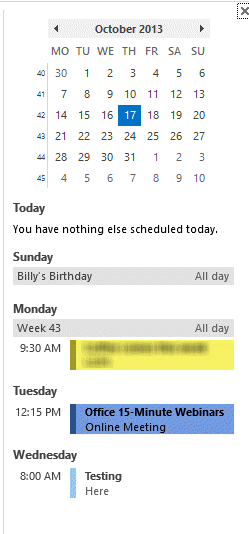 Among the issues that the Outlook 2013 hotfix that came out this week addresses is one that annoys many users: the Calendar Peek displays appointments for the selected day only, not the next several appointments.
No more! The hotfix restores the behavior of the Calendar Peek to the behavior users were used to with the To-do Bar in older versions, displaying appointments on the next 7 days.
Other fixes included in this hotfix:
When you mark an email message as read or unread in the Inbox folder in Outlook 2013, the position of the Inbox folder is changed in the Folder pane.
When you enable Touch Mode in Outlook 2013 on a touch device then hover the mouse pointer over a calendar item to see the information about the item, no information is displayed.
Issues affecting developers:
When try to add attachments to an email message that is an inline reply by using the Outlook Object Model (OOM) in Outlook 2013, the body of the email message reverts to the text of the original email message.
When you install a plugin that associates a form region together with the Reading pane in Outlook 2013 and open an inline reply then switch to another folder, two form regions are displayed for the email message.
Issues affecting Exchange server users:
When you set up an automatic reply, you receive and error message: Your automatic reply settings cannot be displayed because the server is currently unavailable. Try again later.
When your account password expired less than ten days ago and you log on Outlook 2013, you do not receive a password expiration notification.
When you synchronize Outlook 2013 with SharePoint Server, an alternative URL is used instead of the primary URL.
The administrator configures a resource forest that contains an Exchange server and configures a user forest that contains user accounts, and one of the user accounts is associated with a computer that has Outlook 2013 installed. When an email configuration test is run, the test fails.
Download the hotfix from Description of the Outlook 2013 hotfix package (Outlook-x-none.msp; Outlookintl-.msp): October 16, 2013. Note: This hotfix will be rolled into a future cumulative update.
More Information
For a complete list of all updates included in the October update, see
Office 2013 cumulative update for October 2013
Published October 17, 2013. Last updated on July 18, 2014.