• Skip to main content
  • Skip to primary sidebar
  • Skip to footer

Outlook Tips

Learning Microsoft Outlook One Tip At A Time

Diane Poremsky [Outlook MVP]

  • Home
  • Tips Archive
  • How to...
  • Beginner
  • Outlook.com

Tip 735: Contextual Spelling

Every so often we see a question from someone asking why Outlook adds an extra space following apostrophes. This isn’t an Outlook problem, but it is a sign we spend too much time in Outlook…

This is caused by Contextual spelling in Office. Contextual spelling picks up words that are spelled correctly but used out of context, like there and their or pair and pear. Its disabled if you have less than 1 GB of ram as it’s a resource hog. (A really convenient resource hog!)

In older versions of Outlook, make the check the contextual settings in Tools, Options, Spelling, Spelling & Autocorrect Options. Look for a setting for 'Use contextual spelling' and uncheck it. In Outlook 2010, it's at File, Options, Mail, Spelling and Autocorrect Options.
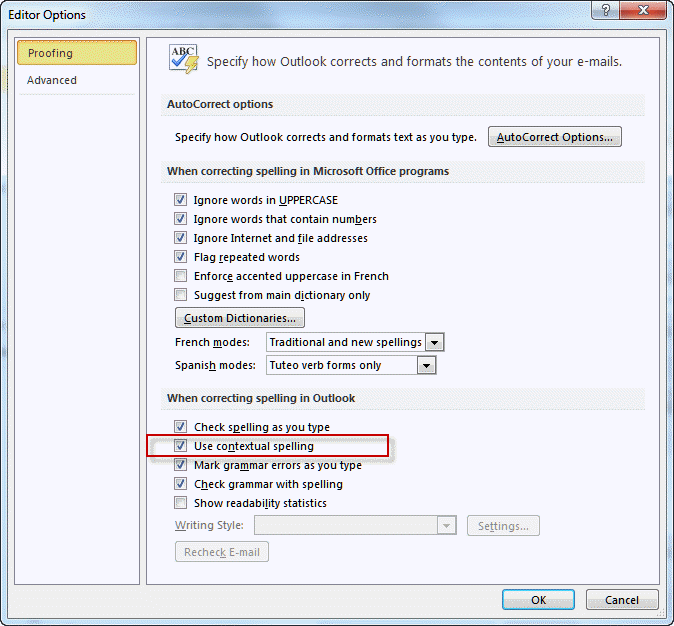
Turn Contextual spelling off
[Click to view larger image]

If you want to use contextual spelling, you can undo the changes it makes in error by pressing Ctrl+Z right after typing the apostrophe. Backspacing then retyping the apostrophe may also take care of it.

See Choose how spelling and grammar checking work for more information about contextual spelling.

Published April 16, 2010. Last updated on June 7, 2021.

Share this:

  • Twitter
  • Facebook
  • LinkedIn
  • More
  • Print
  • Tumblr
  • Reddit
  • Pocket
  • Pinterest

Related posts:

Today I’ll answer common autocorrect questions. Q: The program insists on capitalizing the first letter of every line even if notTip 697: Autocorrect Q & A This is really a Word problem and since Word is also the Outlook email editor, I’ll mention this handy (and sometimes annoying) feTip 689: Automatic Underlines Its been a few years since I last covered Reading layout and it’s time for an update. An Office user asks: “All e-mailed docs openTip 500: Word's Reading layout After accepting (or declining) a meeting request, it’s removed from the Inbox and is only on the calendar. If you’d like to keep aTip 678: Keep meeting requests
Subscribe
Notify of
4 Comments
Newest
Oldest Most Voted
Inline Feedbacks
View all comments

Primary Sidebar

Search OutlookTips

Training and one-on-one assistance

Do you need help setting up Outlook or want some one-on-one training? I'm available for hire. See Training and one-on-one assistance for fees and to check availability.

All-Time Most Popular Posts

  • Windows 7 and Vista Start Search field
    How to start Outlook in safe mode
  • outlook.com icon
    Delete a message stuck in Outlook's Outbox
  • How to use Outlook's Command line switches
  • Use Cleanviews switch to reset all views
    How to Reset the View on Outlook folders
  • Where are my Outlook Files?
  • Folder paths
    How to Find Folder Paths in Outlook Mailboxes
  • How to use Scanpst.exe to repair Outlook data files
  • Outlook's Missing Holidays
  • backstage page
    Where is File tab in Outlook?
  • Icons found in the Inbox, Message Headers, and Toolbars

Footer

Recent Posts

  • Log into multiple Outlook on the web accounts
  • Keeping Hackers out of Microsoft accounts
  • Microsoft Account Closure Email
  • Outlook on the web Quick Actions moved to the right
  • Automatically sign out of Outlook.com

Recent Bug List

Microsoft keeps a running list of issues affecting recently released updates at Fixes or workarounds for recent issues in Outlook for Windows.

Office Update History

Update history for supported Office versions is at Update history for Office

Resources

Ask questions and share your knowledge in Outlook Forums.

You Might Like

Where is File tab in Outlook?
Using Two-factor authentication
Where are my Outlook Files?
How to use Outlook's Command line switches

© 2003–2025 · Outlook Tips

wpDiscuz
You are going to send email to

Move Comment