![Diane Poremsky [Outlook MVP]](http://www.outlook-tips.net/images/2014/MVP_BlueOnly.png)
A reader wanted to know if he could configure Outlook to automatically compact the pst every time he closes Outlook.
Yes, this is possible, using the PSTNullFreeOnClose registry key. This can lengthen the time it takes Outlook to shutdown and if Outlook is forced closed during the compaction process the data file could become corrupt. If you use both this key and the option to empty deleted items on exit, Outlook will take much longer to exit.
However, this setting can be useful to security conscious users as compacting removes all traces of deleted messages, making it impossible to recover the mail.
How Outlook works: when you delete an item and empty the deleted item folder, the messages (and other items) are removed from the index but left in the data file. The space used by these deleted messages is called “white space”. Until Outlook recovers this space, it may be possible to recover deleted messages using recovery software. Outlook will automatically compact the data file when the “white space” reaches around 20% of the data file’s size and the computer is idle. Because it runs as a background service, it can take days for Outlook to fully compact the pst file. (This is a great reason to keep Outlook open when the computer is running.)
If you deleted a lot of messages and don’t want to wait for Outlook to get around to it, you can recover the free space by running Compact Now. To do this, right click on the top level of the data file and choose Properties, then click the Advanced button and Compact Now. Keep in mind that it can take a long time to compact a large data file.

If you want to force Outlook to return this free space every time that you close Outlook, you can add PSTNullFreeOnClose to the registry.
Outlook 2010
HKEY_CURRENT_USER\Software\Microsoft\Office\14.0\Outlook\PST
DWORD: PSTNullFreeOnClose
Value: 1 = compact on close;  0 = don’t compact
Outlook 2007
HKEY_CURRENT_USER\Software\Microsoft\Office\12.0\Outlook\PST
DWORD: PSTNullFreeOnClose
Value: 1 = compact on close;  0 = don’t compact
Outlook 2003
HKEY_CURRENT_USER\Software\Microsoft\Office\10.0\Outlook\PST
DWORD: PSTNullFreeOnClose
Value: 1 = compact on close;  0 = don’t compact
This key was introduced in an update for Outlook 2000 and works in all versions of Outlook that are updated with the latest service pack.
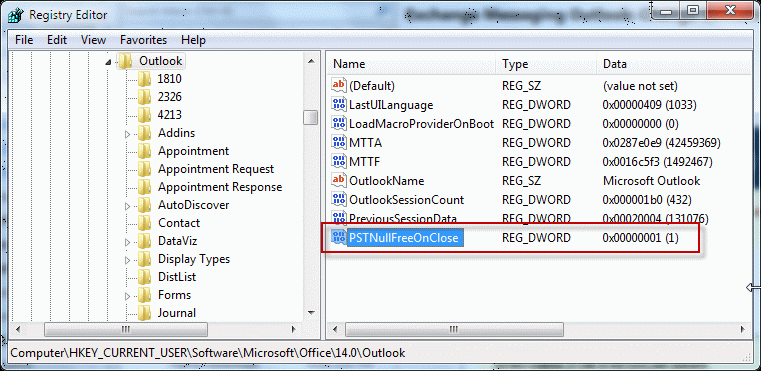
This key works on both pst and ost files. With the value set to 1, deleted data is removed when you close Outlook. When it’s set to 0 or deleted, the data file will not be compacted on close.
Note that the first time you close Outlook after making this change, it may take a long time for Outlook to close.
Don't want to edit the registry? We have reg files you can download and run:
Outlook 2010Outlook 2007Outlook 2003
Published September 22, 2011. Last updated on November 13, 2014.