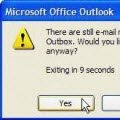
If you attempt to send a message that is too large for your mail server you may be unable to delete it from the Outbox. If you try to open it (to remove attachments) or delete it, an error will say that Outlook has begun transmitting the message.
We have three methods listed below that can be used to remove the stuck message. The first two methods are the easiest and either should work for most users.
The solutions on this page are for messages you can see in your Outbox. If there is an invisible message Outlook keeps trying to send, see Delete Stuck Read Receipts using MFCMAPI for the steps needed to delete the hidden stuck message.
Find the Message using Instant Search
Users with Windows 7 or Vista and Desktop Search configured to search Outlook data may be able to delete the stuck message using Bill’s method. If you use an older Windows version, you’ll need the Windows Desktop search engine installed.
Messages deleted using this method are permanently deleted and bypass the Deleted Items folder.
Bill’s Method
- Close Outlook and wait a few minutes for it to close completely.
- Type outbox in the Start menu’s search field.
- Wait for Search to finish then find the message, select it and press Delete
Search may find a lot of messages. Using store:mapi outbox as your search terms may reduce the number of results and make it easier to find the stuck message.
Work Offline

The first thing you should try is setting Outlook offline using the File, Offline menu. Wait about 5 minutes or so before trying to delete the stuck message. Or, close Outlook after setting it offline and reopen.
Offline mode is not supported in older versions of Outlook but disabling the network card will have the same effect. Either disable the card in Windows Control Panel, under Networking, or disconnect the network cable or turn off wireless card. Wait a few minutes for Outlook to complain about the lack of network access, then delete the message.
If you are unable to delete the message while in offline mode or cannot go into offline mode, you’ll need to change your default delivery location. Note that this option should be rarely needed – if you are patient and wait a few minutes for Outlook to stop the message spooler, or close Outlook and restart it in offline mode, in almost all cases, the stuck message will delete without issue.
Change Default Delivery Location
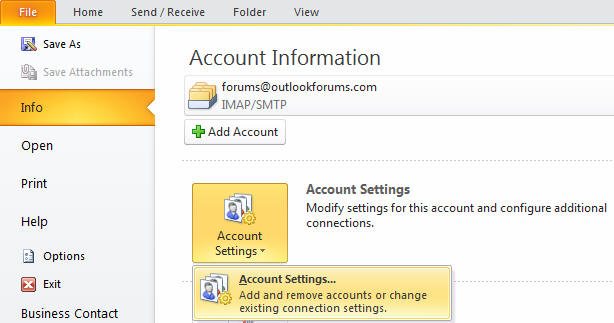
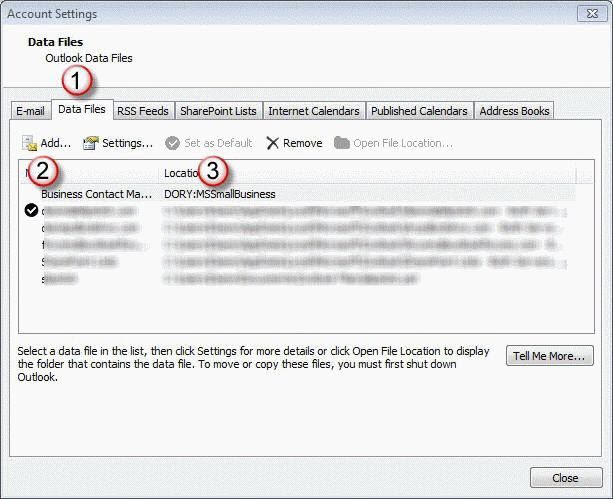
Outlook 2010 and Outlook 2007
Outlook 2003 and Outlook 2002
Outlook 2011 for Mac
The above instructions are for Window’s Outlook only. “loti ” is an Outlook 2011 user said the following steps work in Outlook 2011.
- Right click on message in outbox, choose “open message”
- Remove the attachment
- Press send
It then re-send the message without attachment (3kB instead of >30MB) — end of story. Phew!
Related posts:
« « Send Links by E-mail in Windows XPChanging the Microsoft Office CD Key » »


Many of the solutions are complex. Here is a simple one.
Open Outlook, open File menu, select Work Offline (Item should now be checked). This method only succeeds if you now DISCONNECT PHYSICALLY from your wifi or Ethernet network. Go to the Outbox and select the file that’s stuck. Press the Delete key or select Delete. The file will be removed. Reconnect to your network and click again on Work Offline, which should now be displayed as unchecked. You should now be able to use Outlook normally again.
That’s actually our first recommendation – and disconnecting from the internet is not necessary but Outlook does need a few minutes to release the stuck message. If you wait about 5 minutes, it should delete without issue.
Tried everything to delete outgoing messages that are hung up including creating a new default database, working off line, working in safe mode, disconnecting from my modum and loading the mfcmapi executable and trying to manually delete. No luck and shuts down mail every time.
Office 2007. Help!
Office 2007. Tried all the suggestions to delete two hung messages in outbox (originally from “report junk mail” utility – which I’ve removed). Tried working off line, ditto safe mode and deleting (message already sending), changed data base and loaded mfcmapi executable and followed directions to delete. No luck and shuts down outlook everytime I try to send.
HELP!
its working now in my system as well thanks for help
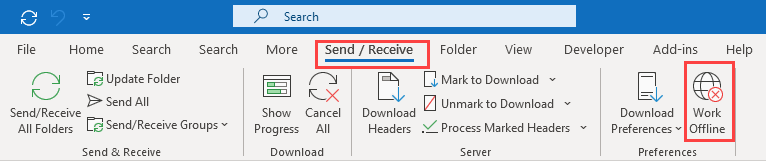
First of all the “Work Offline” is not in the File menu, but the Send/Receive menu. Click on it and restart outlook. You will then be able to delete the file. Click Work Offline again in the Send/Receive tab and restart just to make sure everything is happy.
Where you find the Work Offline command depends on your version of Outlook. In Outlook 2007 and older, it is on the File menu (as shown in the screenshots in this article).
In Outlook 2010, its on the Send/Receive ribbon as seen in the screenshot at http://www.outlook-tips.net/2011/2796/delete-a-message-stuck-in-the-outbox-outlook-2007-2010/
This was such a great help. It worked.
thanks for the “work offline” option – this really worked!!!
Thanks it Worked for me. Saved Lot of time. It was very slow due to the stuck message.
OH THANK YOU!!!!
I LOVE YOU!
WOw! That was very easy. Thanks so much! I dont why others made it so complicated.
Wow what a wonderful site you made me feel like genius thanks for the tip to delete an email stuck in my mail box :)
explanation perfect!
Thanks PaulHK for your simple solution… and that relates to both the communication and method of accomplishing the objective!
thank you, this is the best solution and very easy to do,
this works
worked 1st time! thanks for the advice!!
I can’t believe I looked through three other blog explanations on how to delete a stuck message and ‘open the message and remove the attachment that is too large’ turned out to be the best and most direct answer. Having a forehead slap moment.
Thank you for having common sense.
Worked great thanks, I was getting tired of problem
This helped!I wonder what I was asking our IT guys..didnt help!This did!
Have tried all of the suggestions, working offline, physically disconnect from router but still no luck. Cannot send or receive emails at all. Have tried to open message and delete attachment but cannot. HELP!!!
What happened when you tried deleting the attachment?
How long did you wait? Depending on the message size, you may need to wait longer than 5 min for outlook to release the message.
When I try and delete (even when working offline after waiting 30 minutes) by pressing shift and delete i get a dialog box message “Some items cannot be deleted. They were either moved or already deleted, or access was denied”. If I try to open the message the dialog box says “The file c:\…..pst has reached its maximum size”.
““The file c:…..pst has reached its maximum size”.”
Tells me its a different problem. Try deleting the message using Shift+Delete. If that doesn’t help, see Repair a 2GB Personal Folders File for other solutions.
Solution worked fine, thanks for the solution.
Had massive email with attachment stuck in my outbox. Found your suggested solution. It worked. Thank you!
Thanks for the suggestion, it was so easy to remove the file as you suggested
Thanks lots…damn my boss got me to do that and i had no idea but you saved my cute ass :* :* :*
Hi, I was able to get clean out the outbox after resorting to creating a new pst file but have now lost all of our email folders?? I was able to get some back from the favourite folders section but lost all the others?? Outlook 2003 – Any ideas?
You used the instructions to create a new, default pst? After you delete the stuck mail, set the old pst back as default.
I’ve also tried all of the above. I can’t open it to delete attachment as good old Microsoft thinks that it has ‘already started sending’ the bloody message. Shift delete doesn’t work as good old Microsoft insists I don’t have the right privileges and I should skitz out and talk to myself (I am the bl%^Dy administrator)…. offline mode…no good…I have had this email stuck since december. This is driving me NUTS
:( <—(that's me weeping in frustration lol)
How large is the message? Did you set Outlook offline and wait at least 5 min, more if the file is huge? The average large message (under 30 MB) will stop sending within 5 minutes or so but really, really large ones need more time. (I needed to wait about 15 minutes for a 100+ MB message to stop sending.)
Thanks for the reply…I’m off to walk my kids in the park..all is set to offline and I’m disconnected from the net and my modem is off….I’ll see what happens when I get home. The attachment size is 148MB…so maybe I just haven’t waited long enough. I’ll let you know how I go.
Cheers
:)
Hi, In my folder it says that there is a message in my outbox which can’t be sent. But if I open the outbox, there is no message, so I’m not able to select and delete it. Nevertheless the outbox is trying to send a message !! Can anyone help me with this ?
Thanks,
Guys, i tried everything -diconnecting for 30 min, making new folders etc. -nothing worked, I still had error messages (Outlook 2002)
Finally I found in this tread solution, very simple. In offline mode I used Shift+delete instead of usual right click menu to delete messages. It immediately worked for file with large atatchment. Amusingly- notmal delete procedure still did not worked for other 5 messages in out box, For each ofthem I had to use shift+delete and only this helped to delete all of them one by one. Hope it will help to others like me
This may because your data file was “full” – when you delete the message goes into the deleted items folder. Shift delete bypasses the deleted folder and deletes it permanently. If you don’t want to edit and resend the message, Shift+Delete is better.
I have the same problem as Christine. There is no message in my Outlook 2011 for Mac. Initially, I tried sending a message from Outlook, via Gmail, that was too large because of size restrictions. There error message was the following: 5.2.3 our size guidelines. n27sm14783408yhe.18 .
I tried to go into gmail… no file is in the outbox or drafts there. I was able to actually delete the message from the outbox, but it still tries to send a message every time.
Any other thoughts… I’ve tried all of the above methods and still have to deal with constant error messages emerging.
Thanks.
When a message is not in Outlook but something tries to send it, its usually antivirus that is configured to scan email at fault. Which antivirus do you use?
Hi,
I’m using Outlook for Mac. There is a message in the outbox, but you don’t see it. So even when I go offline, I don’t see the message and therefore can’t open it and even delete it.
Any tips for me ?
I don’t think I even have an antivirus running……
Here is an an easier way. Click on the windows icon on the bottom left tool bar. Type outbox in the search programmes and files and you should see the email and it’s attachments. Delete away!
This will only work if outlook isn’t open and still trying to send it… and you need to use Windows Desktop Search (optional in Windows XP).
EXCELLENT!! I’ve had an oversized e-mail in my outbox for 11 months and was finally able to delete using Bill’s recommendation above (Outlook 2003).
As Diane states below, it’s best to close Outlook then use the Windows icon (bottom left too bar) and type “outbox” as Bill stated above.
This will likely bring up a number of files but if you look closely the items stuck in your outbox will be there also. Before doing this I took Outlook offline but I’m not sure if this is necessary if you’ve closed Outlook.
Thank you all for your assistance.
if you type store:mapi outbox it will limit it to outlook items and may reduce the number of items shown.
Finally a solution to the problem that’s been plagueing my outbox for a year! Thank you!!!
Fantastic !!! I struggled for days and then Googled the problem and came to your site. How simple if you know how !!
Thanks, I wish all tech-help would be as easy and well described !!!
JHK
Brilliant, this solved it. Thanks guys, good simple advice.
Thank you Bill.
It worked like a charm. Start the computer – do not open outlook – do per Bill’s message up – search for the email attachment you want to delete – sorting them by size would help – delete the email file – shut down – restart – bingo the stuck email would be gone and may show up in deleted folder – empty it
Thanx, it was a very fast fix, thanks a lot.
Bill’s method saved me! It worked and I was up and running in five minutes–the too large file had be out of commission for four hours! So amazed by Bill’s help. Thanks!
Bill’s method is a lifesaver! The cancel button no a freebie Word macro to e-mail with attachments didn’t cancel and things went progressively downhill from there. Fortunately, the hundreds of duplicate messages went to MY inbox, but several thousand more were clogging up my outbox. Canceling all operations within Outlook did not work, deleting all the messages from the outbox within Outlook did not work. My computer is deleting over 6000 items in my outbox folder as I’m typing this. Thank you SO MUCH!
Bill’s method worked!!!! Yahoo!!
Thanks for the solution.
BUT
every time I send a new e-mail (however small) it keeps getting stuck in the Outbox and doesn’t get delivered. I can receive mails OK but can’t send any! Any ideas?
Richard
It is getting marked as read? If you don’t look in the outbox, does it send? Does it send if you use Safe mode? (Close Outlook, hold CTRL and click the Outlook icon to open it. A dialog will come up asking if you want to use Safe mode.)
This worked great! Deleted the whole file.
Sooooooooo helpful. Thank you! Going offline and deleting it worked.
Thanks for your help! Bill’s method worked like magic! Finally a clean outbox! Eureka!!!
Thanks for this great post. I had a number of emails with large attachments stuck in the outbox and use the “outbox” method under Win 7 to great effect.
Simon
Thanks, worked like a charm. Just went to file, work offline. Went into outbox and tagged file and hit delete. Gone in less than 30 seconds.
Thanks SO much :)
Thank you very much for this GREAT! information.
It help me alot.
BEST REGARDS,
Farhan
Thank you paulhk!!! Your solution Worked instantly! And so easy!!! Why does MS not bother to fix such a pesky nuisance??? Talk about user un-friendly.
I’ve been trying to get rid of the email in the outbox for 2 days. Thank you.
the explanation of how to delete an unsent message from outlook gave the crucial factor that you need to wait after setting your inbox to work offline.
“Brilliant” as I am the proverbial idiot when it comes to matters like this but now …………….move over Bill Gates.
I’ve tried to do everything Paul suggested and I waited for a couple of hours but the stuck email is still there. It was a reply to a fairly small email without any attachments I went to File/Work Offline/Outbox and clicked Delete and nothing happened, then I tried Shift/Delete and got the “are you sure” message. I clicked Yes then I got this message: this item could not be deleted. It was either moved or already deleted or access was denied. I waited over an hour then tried the same thing again with exactly the same results. This is my business email client and I’m sure I’m losing business emails. Please help!!!
What tye of account is configured in Outlook – ie, POP3, IMAP, or Exchange?
If Exchange, right click on the folder and choose properties then click the button to clear offline items. You can also log into OWA and see if the message is stuck in your outbox.
Thanks a lot. The problem was instantly rectified. Thanks a lot.
Wish I had looked this article up before I wasted valuable time trying to delete the stuck file. My problem was that as soon as I opened Outlook it immediately started sending the stuck file. I didn’t think to work offline to stop the send function. I’ve learned my lesson and there won’t be a next time.
I’m so glad I came across this article. Your “work offline” method worked well and quickly. My headache is now disappearing. Thank you!!
THX ALOT GUYS IT WORKED
Thanks…paulhk
you are too smart…
it was working :)
Thanks for advice on how to delete stuck message in Outlook. I openend Outlook offline, waited a bit and then deleted a movie that got stuck in my outlook for a couple of days.
I too had stuck Outlook2003 messages in the Outbox. I tried all of the above to no avail but a shutdown/reboot/restart always seemed to work. I have finally worked out the real solution:
Archive off as much as possible in order to reduce the size of the PST file
File | Archive
- Then scroll to the top of the Archive window select “Personal Folders” and turn it blue by selecting it.
- Choose a date. I chose anything older than 1/1/2011.
- Name your archive file. I called mine outlook2010.pst
- check the box for Include items….
- OK
If, in the future, you need to retrieve anything that might be in that archive, File | Open | Outlook Data File | then pick that file. It will open as another “Personal Folders” at the bottom of your All Mail Folders window. You should close it when done.
I suppose that Outlook 2003 has sensitivity to very large .pst files.
I LOVE YOU – whoever wrote this – I love you. fix number one (search Outbox in the start menu) worked like a charm!!!
This indicates the pst file may be near its maximum size. ANSI pst have a limit of 1.87 GB and between 14,000 and 65,000 messages per folder. With Outlook 2003 you should be using a Unicode format pst which has virtually unlimited file and folder sizes.
Bill gets the credit for that nifty trick. :)
Bill’s method worked for Outlook 2007 running on Windows Vista Business. Thank you very much for helping to resolve a frustrating problem!
Used the offline method. Changed outlook to ‘work offline’ in the file menu, closed outlook and reopened it. Then located the email, and deleted it; 1 shot, worked like a charm.
It work ! Using Bill’s Method.
Thank you very much!
My outbox shows (1) to the side of it like there is an outgoing email, but when I open the outlook box there is nothing there to delete. I tried right clicking to “delete all” “clean up folder” etc and nothing happens. It does show 1 Item , 1 Unread at the bottom left but there is not an email showing to delete. Any suggestions?
What type of email account? The outbox folder looks like the last outbox folder in this screenshot?

Did you try using MFCMapi to see if there is a message stuck in some hidden state? The steps are here: delete message that keeps resending
If the sent item doesn’t properly move to the sent folder and you have ‘show total count’ enabled instead of ‘show unread count’, you’ll see a number in green brackets. Blue parenthesis means unsent mail is in outbox. If you use a server-based account and have “invisible” messages in outlook (either blue or green numbers), you might see the message in the online copy of the outbox.
It’s the third one with the (1) in Blue. I did not try using MFCMapi as of yet – it looked complicated to me! I went to the online email through explorer (we have microsoft exchange server) I did not find an “outbox” there. When I send an email going through here … the email goes immediately.