![Diane Poremsky [Outlook MVP]](http://www.outlook-tips.net/images/2014/MVP_BlueOnly.png)
We're seeing more and more errors caused by compatibility mode. I couldn't understand why users were even touching the compatibility mode settings until someone said they ran the Troubleshoot Compatibility utility in Windows and IT made the changes. Yikes.
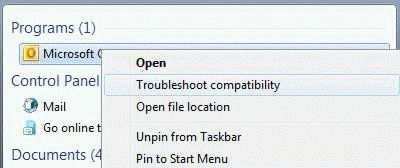
When you right click on the application shortcut, one of the options is Troubleshoot compatibility. DO NOT use this. It is not necessary – Outlook 2003, 2007, 2010, and 2013 are fully compatible with Windows 7, 8 and Vista and the default compatibility setting (nothing checked) should be used. Any issues with older versions of Outlook on Windows 7/8 or Vista will not be solved by changing the compatibility mode.
If you get any of the following error messages, you may have a compatibility setting checked. If Outlook is actually buggy, check the compatibility setting.
Cannot start Microsoft Outlook. Cannot open the Outlook window. The server is not available. Contact your administrator if this condition persists.
Microsoft Outlook has encountered a problem and needs to close. We are sorry for the inconvenience.
The requested operation failed
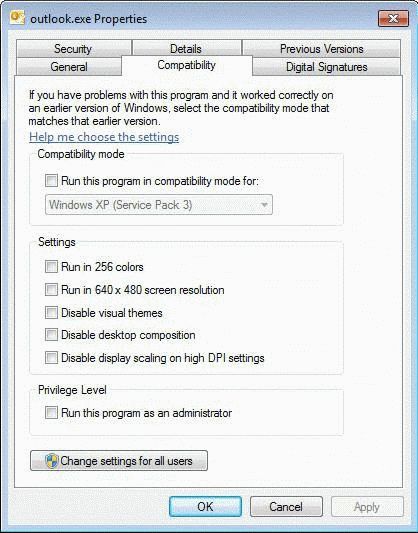
To check your compatibility settings:
- Open the Start menu (in Windows 8, go to the Start screen)
- Type outlook.exe in the search field or on the Start screen.
- Right click on the file and choose Properties.
- Look on the Compatibility tab.
- All selections should be unchecked.
Note that Run as Administrator may solve some issues involving permissions but is not needed as a general rule.
More Information
Tutorial: Checking Compatibility Mode
Published March 19, 2010. Last updated on August 14, 2013.